
Families ask what's happening today. Your screens should answer before they reach reception.
Every one of those screens can also sell ad slots to local businesses, and you keep up to 92% of every sale. You run a care home. NowBoard gives you screens that your activities coordinator, receptionist, and senior carers can update themselves, from a phone, a tablet, or the office computer. Families see what is happening today. Inspectors see evidence of communication. Staff see what they need to know.
No credit card required • Cancel anytime • From £10/TV/month ex VAT • No IT skills needed
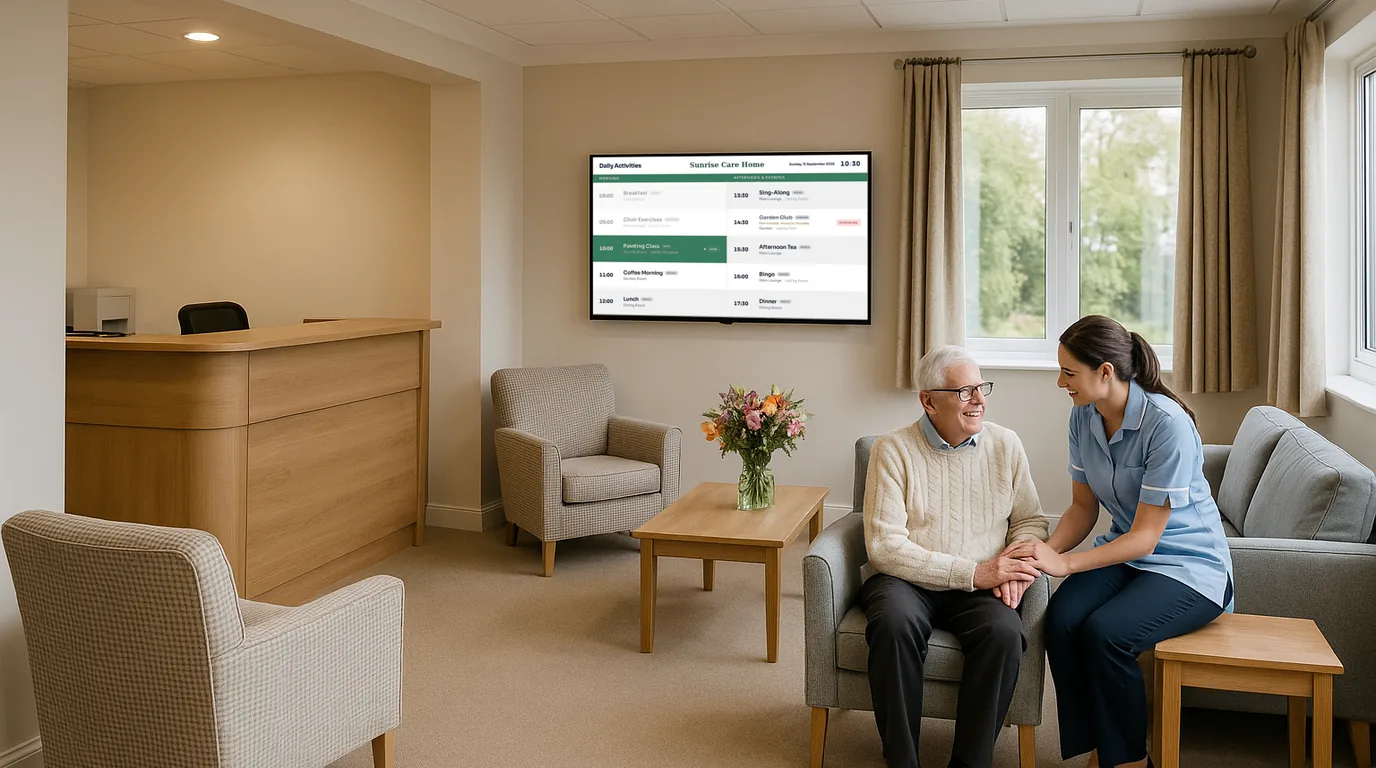
Your families want to know what's happening. Your inspectors want to see evidence. Your whiteboards can't do either.
Care home managers carry a communication burden that few other roles demand. You are accountable to residents who need routine and reassurance. To families who want to feel confident their relative is active, engaged, and safe. To CQC inspectors who want documented evidence that information is current and accessible. To staff who need to know what is happening across each shift without relying on handovers that get interrupted.
If your activities coordinator is off sick, you rewrite the lounge board before the medication round to show what the cover carer can run. A family member arrives at 9am and asks whether the music session is still on. The whiteboard has no date on it, so they cannot tell you updated it this morning.
Whiteboards lose family trust. Printed boards fail inspections. Cork boards look like nobody is in charge.
Whiteboards are fast but impossible to trust
No timestamp, no update history. If a schedule changes mid-session, the board stays wrong until someone walks back. CQC inspectors ask: "How do you ensure this is current?" A whiteboard cannot answer that question.
Printed boards need a key, a printer, and time you don't have
Print, laminate, find the key, unlock the glass board, swap the sheet, relock. Fifteen minutes per update across four boards is an hour per day. Most care home managers do not have a spare hour, so the information stays wrong.
Families judge the home by what they see on the walls
The first thirty seconds between walking through the door and reaching the manager's office form an impression. A dated whiteboard or chaotic cork board does not say "we are organised and professional." It says "we are too busy to keep up."
CQC inspectors look at your displays as evidence
Under Well-Led, inspectors assess whether information is accessible, current, and person-centred. A lounge display showing yesterday's activities, or a dining room board showing last week's menu, makes a note. The difference shapes your inspection report.
Screens your whole team can update: showing families, inspectors and staff exactly what they need to see
NowBoard gives care home managers screens that solve the communication problems whiteboards and printed boards cannot. Every screen is managed from one dashboard. Every screen can be updated by the staff member responsible for that content. Every screen shows a timestamp, and you can see every screen from your phone at 6am when you're checking everything is ready before the CQC inspector arrives.
Plug a NowBoard Player into any TV or screen
A small device, about the size of a phone charger, connects via HDMI. Uses your existing wifi. Each NowBoard Player costs £149 ex VAT, UK only (Player Pro £199 ex VAT). Use TVs you already have or ask us about UK TV supply from £300–£3,000 ex VAT per TV by specification.
Set up your screens by location
Entrance: Welcome Display. Main Lounge, Activity Board. Dining Room, Menu Board. Staff Room, Shift Notices. Each screen has a name and a purpose. The dashboard shows them all.
Give your team access to their screens
The activities coordinator updates the lounge screen. The kitchen updates the dining room screen. The receptionist updates the entrance screen. Each person sees only the screens they are responsible for.
Update from any device in under 30 seconds
Open NowBoard on a phone, tap the screen to change, type the new information, save. The lounge screen updates. Unlike the whiteboard, there is a record that it was changed, when it was changed, and who changed it.
How care home managers use NowBoard to solve the problems that keep them up at night
Keeping families informed: displays that build confidence at the front door
A NowBoard screen in the entrance shows a welcome message, today's date, visiting hours, and the day's headline activities. "Welcome to Willow House. Today: Chair yoga at 10:30am. Garden club at 2pm." The family member knows immediately that this is a home where things happen and where the information is current.
When visiting policies change (restricted visiting during a flu outbreak, altered hours over Christmas, a mask request during a norovirus incident) the entrance screen updates instantly. No printing. No taping a notice to the door that blows off in the wind.
CQC evidence that your communication is current and accessible
NowBoard screens provide visible, timestamped evidence of current communication. An inspector walking through the home sees an entrance screen showing today's date and visiting information, a lounge screen showing today's activity schedule, a dining room screen showing today's menu, and a staff room screen with today's key notices, each showing when it was last updated.
If an inspector asks "How do you ensure this information is current?": you show them the dashboard, the update history, and the staff access controls.
Managing activities across the home: one update, every screen, no whiteboard runs
The activities coordinator opens NowBoard on her phone. She changes the 2pm slot from baking to film afternoon because the ingredients did not arrive. The lounge screen updates. If there is a second screen in the conservatory or a first-floor lounge, it updates too. The coordinator does not leave the room. She does not interrupt the current activity.
For homes that display the weekly schedule, NowBoard lets the coordinator set up the full week in advance. Monday's screen shows Monday's activities. The schedule rotates automatically.
Staff communication that does not depend on handovers or the back of an envelope
A NowBoard screen in the staff room shows the information every member of staff needs before they start their shift. Today's key notices. Maintenance scheduled. Visitors expected. Appointments for residents. Changes to routine. The deputy manager updates it before the morning shift. Unlike a paper notice, read once and ignored, a NowBoard staff screen shows only today's information, so staff learn to check it because the content is always different and always relevant.
Multi-home groups: consistent displays, central visibility, local control
NowBoard's multi-site dashboard lets operations directors and regional managers see every screen in every home from one place. Each home manages its own content, but the operations director can push group-wide content, updated complaints policy, Christmas visiting hours, to every entrance screen in every home with one update.
Why care home managers choose NowBoard over whiteboards, printed boards, and enterprise digital signage
Any staff member can update in 30 seconds
Open NowBoard on a phone, tap the screen, type the new information, save. If your team can use WhatsApp, they can use NowBoard.
Families see current information at the door
The entrance screen shows today's date, today's activities, and visiting hours. Always current. Families do not need to ask a carer "What's happening today?"
CQC-ready evidence included
Every screen update is timestamped. The dashboard shows when each screen was last changed and by whom. Show inspectors the dashboard, not a whiteboard and a hopeful expression.
Professional appearance without a design team
Large text for residents with visual impairments. Calm colours. High contrast. The screens look professional without anyone touching a design tool.
Works with TVs you already have
Any TV with an HDMI port works with NowBoard. A NowBoard Player costs £149 ex VAT, UK only, or £199 ex VAT for the Player Pro. Setup takes under five minutes per TV.
Affordable for single homes and groups
One Player Licence per connected TV, from £10 ex VAT per TV per month on Starter. Any number of licensed TVs can share a Channel or show different content. Three TVs cost £30/month on Starter, ex VAT. Paid plans include unlimited Boards, Playlists and Channels.
Your first screen is showing information in under an hour. No IT project. No contractors. No waiting.
Sign up free
Create your account online. The Free plan needs no credit card and no procurement paperwork.
Plug a NowBoard Player into a TV
Start with one screen, the lounge TV, or a new screen in the entrance. Connect the Player Pro via HDMI. Connect to your wifi. Five minutes.
Name your screen and add content
"Main Lounge, Activity Board." Type today's schedule. Save. The screen shows it. Ten minutes.
Give your activities coordinator access
She opens NowBoard on her phone. She sees the lounge screen. She can update it. You can still see it and change it too.
Add more screens when you are ready
Entrance welcome display. Dining room menu board. Staff room notices. Each screen takes five minutes to set up. Most homes are fully running within a day.
Questions care home managers ask about NowBoard
Can my activities coordinator update the screen from her phone?
Yes. NowBoard works on any phone, tablet, or computer with a web browser. She opens NowBoard, taps the lounge screen, changes the schedule, and saves. The screen updates in seconds. If she can use WhatsApp, she can use NowBoard.
Will CQC inspectors view digital screens favourably?
CQC assesses whether information is accessible, current, and helps people understand the service. NowBoard screens display timestamped, clearly formatted information that is demonstrably current. Managers report that inspectors comment positively on the screens, specifically on the fact that information is dated and obviously up to date.
What if our wifi is unreliable?
If the connection drops the screen keeps showing the last Board it loaded. NowBoard is designed for older care home buildings with inconsistent wifi coverage.
Can we use the TVs we already have in the lounges?
Yes. Any TV with an HDMI port works with NowBoard. If your lounge TV is used for entertainment during the day, many homes use a second, smaller screen mounted at eye level near the lounge entrance, dedicated to NowBoard.
How much does it cost for a single care home?
£10 per TV per month, ex VAT, so a typical setup (entrance, lounge, dining room, staff room) costs £40/month. No setup fees. No annual contract. Cancel anytime. Every feature is included at every price point. See pricing.
What about care home groups with multiple homes?
Starter is £10 ex VAT per TV per month. Five homes with four TVs each need twenty licences: £200/month on Starter, ex VAT. The operations team manages group-wide content from one dashboard. Contact us for groups with 50+ screens.
Is the text large enough for residents with visual impairments?
Yes. NowBoard layouts use large, clear text designed to be readable from across a lounge or corridor. High-contrast, uncluttered display, purpose-built for screens that people read from a distance.
Do staff need training?
Almost none. If your staff can send a text message, they can update a NowBoard screen.
Your families deserve to know what's happening today. Your inspectors need evidence. Your team needs a tool that takes 30 seconds, not 30 minutes.
Four screens. One dashboard. Updated by your team, from their phones, in under thirty seconds. And when a CQC inspector walks through the door, every screen is timestamped evidence that your home communicates clearly and professionally.
No credit card required • Cancel anytime • UK-based support • From £10/TV/month ex VAT
Running a group of care homes? Get in touch, we will show you how NowBoard works across multiple homes with central oversight and local control.