Get started with NowBoard

Sign up free. The Free plan covers one TV, with no credit card. Or book a demo and we'll show you around.

What you get on the Free plan

You can use the Free plan for as long as you like: 1 TV, 1 Channel, 1 Playlist and up to 5 Boards.

  • One Player Licence per TV: choose the same or different Channels for your licensed TVs
  • Core signage features: Playlists, time-of-day scheduling, unlimited media storage and 1 RSS feed
  • Announcements and notices: post updates that appear on your screen instantly
  • Full Board Template library: light and dark themes included
  • Web player: display NowBoard on any screen with a web browser
  • A screen link for your Screen: open it in any browser, no login needed
  • Community support

Upgrade any time you need more than 1 TV or 5 Boards.

What happens next

After you sign up, your first screen takes about 15 minutes: no engineers, no IT, no fuss.

1

Create your account

Sign up with your name, email and a password. The Free plan needs no credit card.
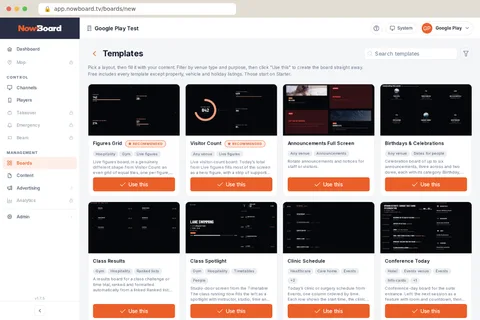
The Templates page in NowBoard: a grid of ready-made Board layouts, each with a preview, venue tags and a Use this button
2

Add your content ~5 min

Pick a Board template for your space: welcome screen, timetable, menu or noticeboard. Add your text and images. It's like filling in a form.
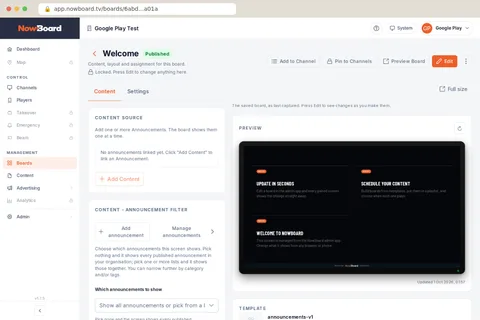
A Board open in NowBoard: Content and Settings tabs, the content it uses, and a preview of the Board as it plays on screen
3

Display on any screen ~8 min

Open NowBoard in any browser, install the NowBoard Player App on an Android TV or Google TV stick, or plug in a NowBoard Player (£149 ex VAT) or Player Pro (£199 ex VAT) and scan the QR code. Your Board appears on screen. No engineers. No IT call.
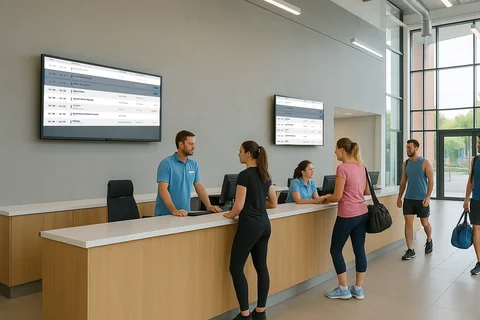
Two wall-mounted screens in a leisure centre reception, both showing the day's timetable

Setup tip: a browser on a TV that runs all day

A browser does not open again by itself after a power cut. Someone has to start it again. Smart TV browsers are not recommended for a screen that runs all day. For a screen nobody touches, use the NowBoard Player App or a NowBoard Player.

Sign up free

Create your account in the NowBoard app. You need your name, email and a password. No credit card for the Free plan.

Sign up free

Why teams choose NowBoard

No spamWe only email you about your account. Nothing else unless you opt in.
Cancel anytimeIf you upgrade to a paid plan, you can cancel with one click
UK-based supportReal people in the UK who reply within one working day
Your data stays yoursYou own your content. Export or deletion is on request to hello@nowboard.tv
Cookie-free analyticsWe use Plausible Analytics: no tracking cookies on our website

Common questions about getting started

Now. Sign up free and set up your first screen today.
No. You create your account with your name, email and a password. We won't ask for payment details unless you upgrade.
You'll be prompted to upgrade to a paid plan. Your content is saved either way, so you can upgrade whenever you're ready.
The Free plan covers 1 TV, 1 Channel, 1 Playlist and up to 5 Boards. For more Screens, upgrade to a paid plan.
No. NowBoard works on any screen with a web browser: TVs, tablets, laptops, kiosks. If you want a dedicated plug-and-play device, you can add a NowBoard Player or Player Pro later.
Yes. Book a demo and we'll walk you through it.
Yes, on request. Email hello@nowboard.tv and we'll export or delete your data for you.

Still have questions?

Talk to us. We're happy to answer questions or walk you through the platform.