
Digital wayfinding for buildings where people get lost, show visitors exactly where to go, on a screen they can read from across the room
Those same directory screens can sell ad slots to local businesses, and you keep up to 92% of every sale. People walk into your building and do not know which floor to go to, which corridor to take, or which room they need. A digital wayfinding display on any TV or screen shows a clear room directory, floor guide, and building layout that answers "where do I go?" before anyone needs to ask. Updated from your phone when rooms change, tenants move, or departments relocate.
No credit card required • Cancel anytime • From £10/TV/month ex VAT
- Rooms and facilities Show where things are and if they are open.
- Update from a phone Room moved for today? Change it in seconds.
- QR codes Visitors scan to open a map or page on their phone.
- From £10 a month Per TV, ex VAT. One TV is free.


Every building has visitors who cannot find where they are going: and no good way to help them
Stand in the lobby of any multi-tenant office building, medical centre, council building, or community centre and count how many people look confused within an hour. They walk through the door. They look left. They look right. They look for a sign, a directory, a person, anything that tells them where to go next.
Say your building printed its tenant directory when every floor was full. Since then two companies have left, three have moved in and one has moved floors. Visitors for the new third-floor tenant follow the directory to the second floor, find the wrong name on the door and take the stairs up, late for their meeting.
The pattern is the same everywhere. People arrive. They do not know where to go. The information either does not exist, is too small to read, is in the wrong place, or was accurate once but is not accurate now.
When visitors cannot find their way, your building pays for it: in wasted time, missed appointments and damaged first impressions
Receptionists become full-time direction-givers
In a building with poor wayfinding, the front desk answers the same location questions dozens of times per day. Each question takes thirty seconds to answer. In a busy multi-tenant building, that is an hour or more of reception time per day spent on directions that a screen could give once, to everyone, simultaneously.
Visitors arrive late because they arrived on time but got lost
A patient walks into a medical centre five minutes before their appointment. They cannot find the practice they need. They arrive at the consulting room three minutes late. The appointment runs over. By mid-afternoon, the clinic is running twenty minutes behind, and it started with one person who could not find the right door.
Printed directories become permanent fiction
A directory printed on paper is accurate on the day it is produced. Tenants leave. New ones arrive. Departments reorganise. The printed directory does not know any of this. It continues to display the building as it was, not as it is. Nobody reprints it because the process is just tedious enough that it never reaches the top of anyone's to-do list.
Your building makes a first impression before your people do
If a visitor's first thirty seconds involve confusion, their emotional state when they reach you is slightly negative before the conversation starts. Poor wayfinding is poor hospitality. A corporate client, a patient arriving for a health appointment, a parent bringing a child to an activity, all form an opinion based on how easy or hard it was to navigate the building.
A digital wayfinding display anyone can update from their phone: showing room directories, floor guides and building maps on any screen
NowBoard is a digital wayfinding display that turns any TV or screen into a building directory, floor guide, or room finder. When tenants change, rooms move, or departments relocate, update the display from your phone. The screen shows the building as it is now, not as it was when someone last had time to reprint a directory.
Plug in a NowBoard Player Pro
A small device (about the size of a phone charger) that connects to any TV or screen via HDMI. Uses your existing wifi. Costs £149 ex VAT, UK only, or £199 ex VAT for the Player Pro, which can also show live video from an NDI source on your network.
Add your building information
Type in your tenant directory, room listings, department locations, or daily room allocations. Add simple directional text ("Second floor, turn left from the lift") or upload a floor plan image if you have one.
Update from anywhere
New tenant moved in? Room allocation changed for today? Practice relocated to a different floor? Update the wayfinding display from your phone, laptop, or tablet. The screen refreshes instantly.
Ready-made wayfinding templates: help visitors find their way
These are the actual Boards your screens can show at entrances and junctions.
How different buildings use NowBoard for digital wayfinding
Multi-tenant office buildings and business centres: a live tenant directory that updates when businesses come and go
A NowBoard digital wayfinding display in the lobby shows the current tenant list with floor numbers and directions. Large text, high contrast, readable from three metres away. When a tenant leaves, the building manager removes them from the screen on their phone. When a new tenant arrives, they are added before the first visitor walks through the door. No reprinting. No signage company. No £150 invoice for a new acrylic panel.
Medical centres and health campuses: helping patients find the right practice without asking the wrong receptionist
In a building that houses mental health services, sexual health clinics, or addiction support alongside general practice, misdirection is not just inefficient, it is a confidentiality risk. A NowBoard digital wayfinding display at the shared entrance shows each practice with its location in plain language. Patients read the screen, walk to the correct location, and arrive without having to explain their destination to anyone.
Community centres and village halls: showing visitors which room their group is in today
A NowBoard digital wayfinding display in the entrance shows today's room allocations clearly: activity name, room, time. The centre coordinator updates the screen each week and adjusts it during the week when changes occur. Visitors walk in, check the screen, and go directly to the correct room. No whiteboard to forget. No doors to open speculatively.
Conference venues and event spaces: directing delegates to the right session in the right room
A NowBoard digital wayfinding display in a corridor or foyer shows the current and next sessions with their room locations. The event organiser sets up the schedule in advance, the screen automatically shows the relevant sessions based on the time of day. Delegates glance at the screen, see where they need to be, and walk there without consulting a programme or asking a volunteer.
Council buildings and civic centres: guiding residents to the right department without queuing at the wrong counter
A NowBoard digital wayfinding display in the public entrance shows the building directory clearly: service name, location, and direction. When departments move, which happens regularly as councils reorganise services, the screen updates before the next resident walks through the door. This also reduces the load on the main reception desk, where staff otherwise field a constant stream of directional questions that delay service for everyone.
University buildings and college campuses: helping students and visitors find rooms, offices and departments
A NowBoard digital wayfinding display in the building's entrance shows the information visitors need in plain language, not "Room 3.22" but "Professor Williams' office, Third Floor, Room 22, turn right from the lift, fourth door on the left." For buildings that host events, the screen shows event-specific wayfinding: "Open Day Registration, Main Atrium. Engineering Labs Tour, Room G.04, Ground Floor."
Why NowBoard is the right digital wayfinding solution for buildings that confuse visitors
Large text, readable from a distance
NowBoard digital wayfinding displays use high-contrast text sized for readability from three to five metres away. Visitors read it as they walk through the lobby without stopping or squinting.
Updated from any device, from anywhere
Tenant moved out? Update the screen from your phone. New department starting Monday? Add it on Friday from your laptop. Room allocation changed for today's event? Change it five minutes before delegates arrive.
Multiple screens, different information
A lobby screen shows the full building directory. A first-floor screen shows only first-floor rooms. A corridor screen shows what is at the end of the corridor. All managed from one dashboard.
Content expires when you say
A conference runs for two days. The wayfinding information appears on the morning of day one and disappears at the end of day two. A temporary drop-in shows every Thursday and hides every Friday. No manual removal.
Works on any screen
Any display with an HDMI port becomes a digital wayfinding display. Use screens you already have or buy consumer TVs at high-street prices. No proprietary kiosk hardware. No touchscreen panels.
From £10 ex VAT per TV/month
One Screen in the lobby: £10/month. Three Screens at key decision points: £30/month, ex VAT. Compare this to reprinting a directory panel (£80-150 per change). Advertising is included on every plan. See pricing.
Turn your lobby screen into a digital wayfinding display in under 15 minutes
Sign up free
Create your account online. The Free plan needs no credit card and no commitment.
Plug in a NowBoard Player Pro
Connect it to any TV or screen via HDMI. Connect to your wifi. The NowBoard Player costs £149 ex VAT, UK only (Player Pro £199 ex VAT), and is about the size of a deck of cards.
Add your building information
Type your tenant directory, room listings, or department locations. Add directional text, "Ground Floor, turn left from the main entrance." Choose a layout: directory-style, floor-guide, or a combination.
Update any time
New tenant moved in? Room changed for today's event? Department relocated? Update the wayfinding display from your phone in seconds. The screen always shows the building as it is right now.
Common questions about digital wayfinding displays
What is digital wayfinding?
Digital wayfinding is the use of screens to show visitors where to go. This includes building directories, floor guides, room listings, department locations, and directional information. NowBoard is software that turns any TV or screen into a digital wayfinding display you can manage from your phone.
Can I show a floor plan or map on the screen?
Yes. You can upload a floor plan image and display it alongside your text directory. Many buildings find that a clear text directory ("Physiotherapy: First Floor, turn left from the lift") is more useful than a map for most visitors, but you can combine both approaches on the same screen.
Can I show different directories on different screens?
Yes. The lobby screen shows the full building directory. The first-floor screen shows only first-floor rooms. The corridor screen shows what is at the end of the corridor. Each screen shows information relevant to its location. All managed from one dashboard.
How much does it cost?
£10 ex VAT per TV per month. One Screen in the lobby: £10/month. Three Screens at key decision points: £30/month. No setup fees. No annual contracts. Compare this to a single directory panel reprint (£80–150) or an interactive kiosk installation (£5,000–50,000). See pricing.
Can I schedule wayfinding information for specific events or days?
Yes. Set a start and end date for any directory entry. The conference wayfinding appears on the morning of the event and disappears when it ends. The Thursday planning drop-in shows every Thursday. The temporary clinic directions appear for the week it runs and vanish afterwards.
Is this the same as an interactive wayfinding kiosk?
No. Interactive kiosks have touchscreens, 3D maps, and turn-by-turn navigation. They cost thousands of pounds and suit very large, complex buildings. NowBoard is a display-based wayfinding solution: it shows a clear directory and directions on a screen, without touchscreen interaction. It suits buildings where the question is "which floor?" or "which room?" rather than "navigate me through 400 metres of corridors."
What happens if our wifi goes down?
If the connection drops the screen keeps showing the last Board it loaded, so visitors still see the directory.
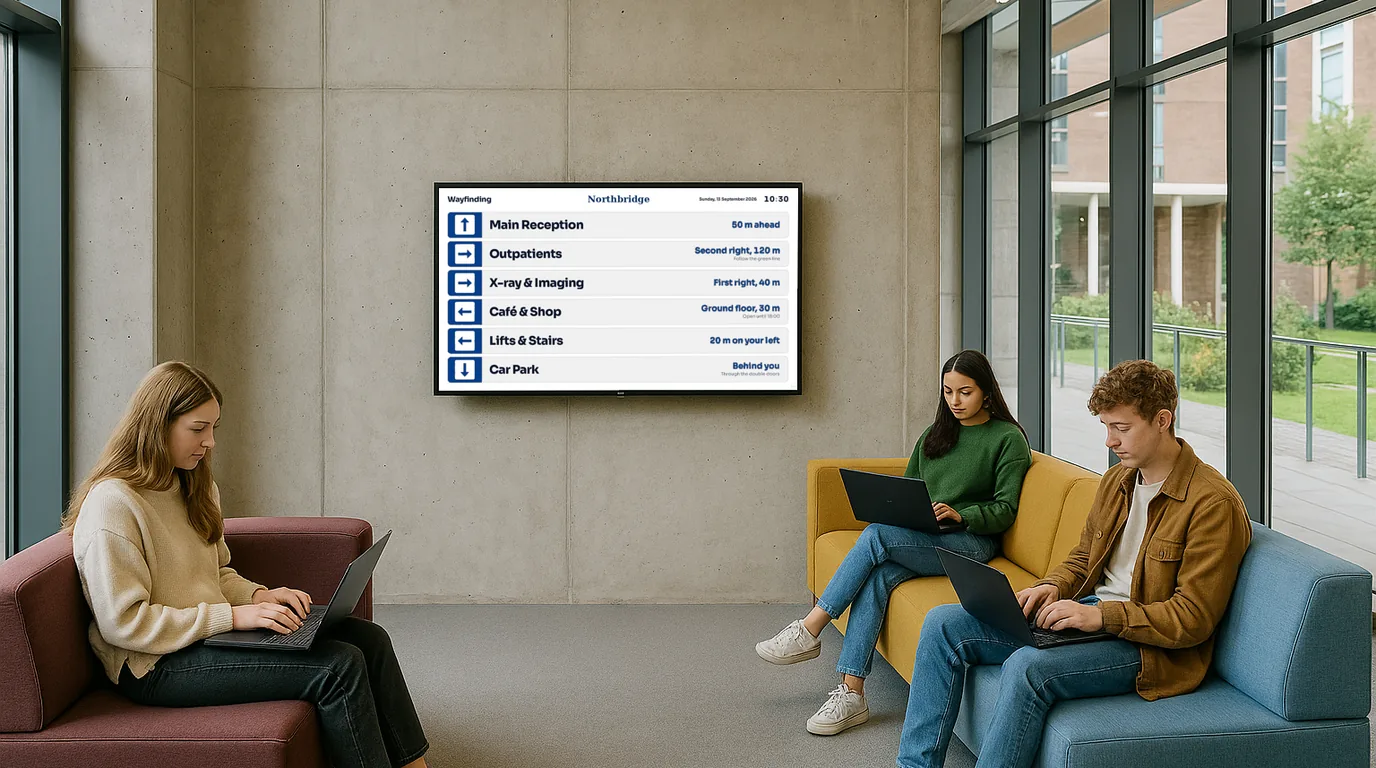
Your visitors are getting lost: put a screen in the lobby that tells them where to go
The printed directory lists a tenant that left six months ago. The receptionist answers "which floor is...?" thirty times a day. NowBoard turns any TV into a digital wayfinding display that shows your building directory, room locations, and directions: always current, always readable, updated from your phone in seconds. No signage consultants. No reprinting costs. No six-week lead times.
No credit card required • Cancel anytime • UK-based support • From £10/TV/month ex VAT
Questions? Get in touch, we will show you how NowBoard works as a digital wayfinding display for your building.