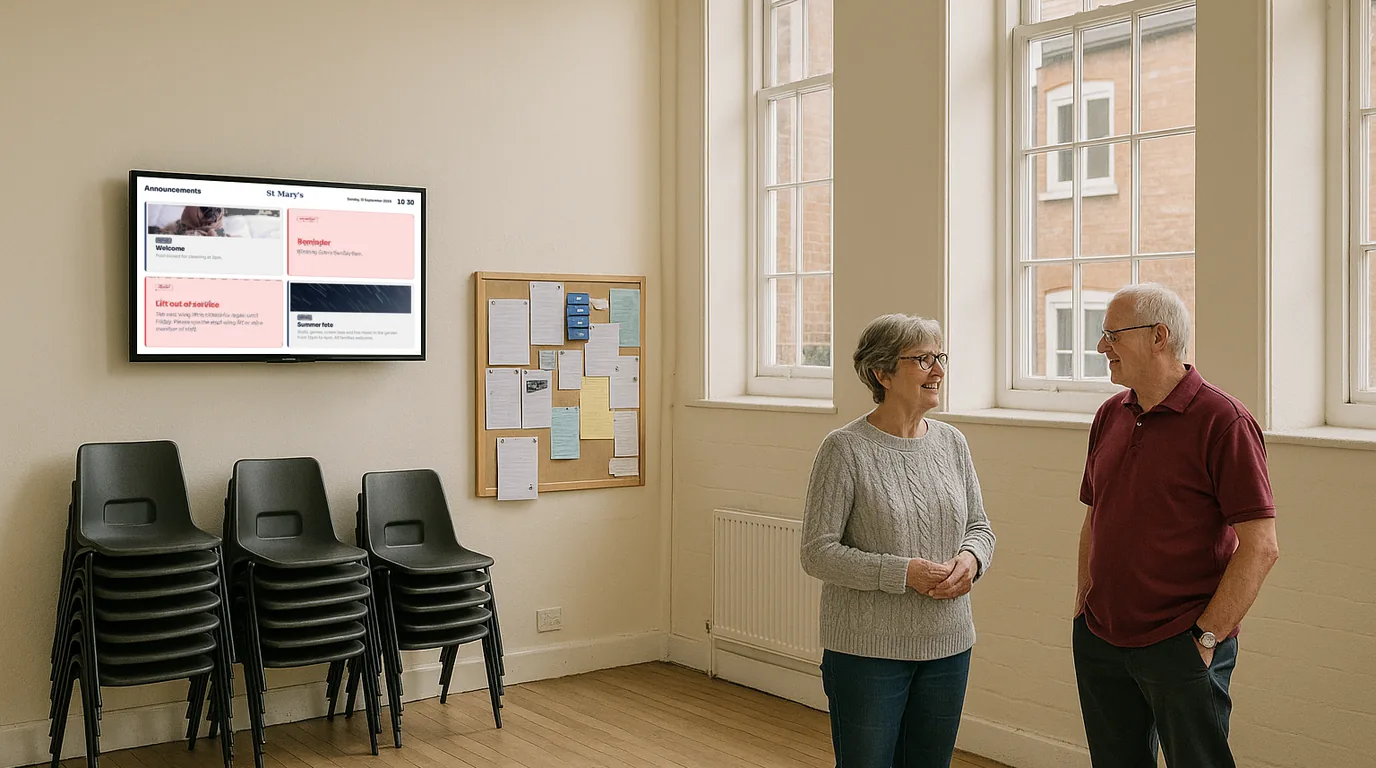
Church and community digital signage — service times, notices and events on every screen

Display service times, events, visitor welcomes and community notices on any screen in your church, mosque, temple or community hall. Update everything from your phone. Live in 15 minutes.

No credit card required  ·  Cancel anytime  ·  From £10/Location/month

The problem

Your noticeboard by the door is the one nobody reads

Every church, mosque, temple and community hall has the same challenge: important information that needs to reach people at exactly the right moment. Service times. Room changes. Upcoming events. Visitor directions.

Right now, most of that information lives on a cork noticeboard near the entrance — usually pinned over last month's notices — or in the printed bulletin that gets handed out at the door and left on the pew. When something changes, there is no way to update it. When a visitor walks in not knowing where to go, there is nothing to guide them.

Service times printed in last week's bulletin get changed at the last minute with no way to communicate the change. Children's groups move rooms and nobody updates the handwritten sign on the door. Events go ahead with half the expected attendance because the community simply did not see the notice in time.

Why it matters

The real cost of paper noticeboards in a community setting

Visitors don't know where to go

A first-time visitor walks in and has no idea where children's groups are, where to sign in, or where the service is being held. A screen in the entrance solves this immediately.

Last-minute changes can't be communicated

Service times change. Rooms move. Events get rescheduled. When the only communication channel is a printed sheet, the community has no way to find out until they arrive.

Events go ahead to near-empty rooms

The community meal, the Alpha course, the concert — events that would draw a crowd if people knew about them. Notices on a cork board that nobody reads are not communication.

Visitors feel lost, not welcomed

For a visitor's first experience of a faith community to be one of confusion — not knowing where to go, feeling awkward — is a missed opportunity that a simple screen can fix.

The solution

Digital signage for churches and community spaces that anyone can manage

NowBoard is digital signage software built for schedules, notices and community information — not advertising loops or complex media production. Plug a NowBoard Player into any screen in your building and start displaying up-to-date, welcoming information within minutes.

No IT volunteer required. No monthly visit from a contractor. Your church administrator, volunteer coordinator or pastoral team can update every screen in the building from their phone, laptop or tablet. When something changes on a Sunday morning, it can be updated in seconds.

  1. Plug in a NowBoard Player

    Use the NowBoard Player Pro — a dedicated HDMI device (£139) that connects to any TV or screen. Or download the NowBoard Player App on any Google Play Certified Android or Google TV device. Connect to your building's wifi and you are ready.

  2. Add your content

    Service times, upcoming events, visitor welcome messages, children's group information. Use NowBoard's templates or build a layout that reflects your community's character.

  3. Screens update instantly

    Change a service time, add a new event, post a last-minute notice. Every connected screen updates automatically. Update from your phone on the way to Sunday service if you need to.

Use cases

Six ways churches and community venues use NowBoard

Service times and order of service

The first screen visitors see when they walk through the door

A NowBoard entrance display shows today's service time, who is leading, the theme or sermon series, and what to expect. For multi-service churches, show the full Sunday schedule so early arrivals know what follows. When times change — as they do for Christmas, Easter, special events — update the screen in seconds. Visitors arriving for the first time see a clear, welcoming display rather than a laminated sheet that may or may not be accurate.

A city-centre church displays the morning service time, children's programme details, and a welcome message for first-time visitors on a screen in the entrance foyer. New visitors regularly comment that it helped them feel expected.

Upcoming events board

Concerts, community meals, Alpha courses — every event visible to everyone

NowBoard lets you display a rolling events programme: community meals, carol concerts, Alpha or Christianity Explored courses, fundraising events, youth group activities, baptism services. The display can rotate through upcoming events in order of date, ensuring that anyone spending a few minutes in the building — before or after a service, during the week — sees what is coming up. No more "I would have come if I'd known about it."

A suburban church running a community café three times a week and monthly events uses NowBoard to display the full programme on a screen at the café entrance. Event attendance increased noticeably once people could see the calendar without searching for it.

Children's group location and times

Parents and children go to the right place without stopping to ask

For families with children, knowing exactly where to take their child and at what time is one of the key anxieties of a first visit. A NowBoard display in the entrance — or along the route to children's areas — shows each age group, the room name or number, the leader's name, and start time. When a room changes, update the screen. When a session is cancelled, add a notice. Parents arriving with children in tow get the information they need immediately.

Visitor welcome screen

A personalised welcome that says "we expected you"

NowBoard displays a dedicated welcome message for first-time visitors — directing them to the welcome desk, explaining how the service works, pointing out where refreshments are, and signposting children's provision. For mosques and temples welcoming visitors from outside the faith community, this is particularly valuable: a screen that explains the space, sets expectations, and makes someone feel welcomed rather than confused. Update the welcome message for specific events or visiting groups.

"Welcome to St Andrew's — visitors please sign in at the welcome desk by the main entrance. Children's groups run in the Hall from 10:15am. Refreshments served after the service." Displayed on a screen at the entrance door.

Community café and refreshments

Today's menu, opening times and special offers on the screen above the counter

Many churches and community halls run cafés, refreshment stations or post-service tea and coffee. NowBoard displays what is available, any dietary notes, and opening hours. For venues with a commercial café, show today's specials, prices and allergen information. Update the display when items run out or when the menu changes. For community volunteers running refreshments, a simple screen with rotating notices and a welcome message transforms a functional service point into a community hub.

Multi-site display

Churches with several meeting points, managed from one place

Growing churches often meet in several locations — a main building, a school hall, a community centre. NowBoard lets you manage screens across all of them from a single dashboard. Each location can display its own service times and local notices while sharing a common events calendar or welcome message across all sites. A central administrator updates everything from one place. Individual site coordinators can manage their own local content. No USB sticks, no printing runs, no emailing updated PDFs to multiple venues.

Why NowBoard

Why churches and community venues choose NowBoard

Most digital signage systems are designed for retail or corporate environments — complex to set up, expensive to run, and dependent on technical expertise that most volunteer-run organisations do not have. NowBoard is the alternative built for teams where the person managing communications is also running the children's programme.

Update from any device

Your church administrator updates the screen from their laptop at home. The youth worker adds a notice from their phone on the way to the building. Anyone with access can update any screen, any time.

Works on screens you already have

Most church buildings have at least one TV screen. Plug in a NowBoard Player Pro (£139) via HDMI or download the NowBoard Player App on an existing Android TV device. No new screens required.

No IT skills needed

If your administrator can send an email, they can run NowBoard. No training courses, no technical manuals, no IT volunteer required to make a change to what is on screen.

Free plan available

NowBoard has a Free plan at £0/month for single-location venues with modest usage. Ideal for smaller congregations or community halls getting started. See all plans.

Works offline

If your building's wifi drops, NowBoard screens keep displaying the last update. When the connection returns, they sync automatically. Screens never go blank during a service.

From £10/Location/month

Unlimited screens showing the same content count as one Location. Pay per Location, not per screen. No setup fees, no annual contracts. See pricing.

Getting started

Get your first community screen live in under 15 minutes

  1. Sign up for a free trial

    No credit card, no commitment. The Free plan is available at £0/month for a single Location if NowBoard is the right long-term fit.

  2. Connect your player

    Plug a NowBoard Player Pro into the HDMI port on any TV or screen in your building. Or install the NowBoard Player App on an existing Android TV device. Connect to your wifi.

  3. Scan the QR code and add your content

    Scan the on-screen QR code to pair the device with your account. Then add service times, events, and welcome messages using NowBoard's templates.

  4. Go live

    Your screen starts displaying content immediately. Most community venues have their first screen running within 15 minutes. No IT required.

FAQ

Common questions about church and community digital signage

We only need it once a week — is that OK?

Absolutely. The Free plan (£0/month) is ideal for single-location venues with modest usage. You only update when something changes — whether that is once a week before Sunday service or whenever an event is added to the calendar.

Can we show Bible verses or devotional content?

Yes. You can display any text content — rotating quotes, scripture verses, devotional thoughts, or seasonal messages. Many churches use NowBoard to display a verse of the week alongside practical notices.

Do I need to buy a new screen?

No. NowBoard works on any TV with an HDMI port. Use a screen you already have in the entrance, hall, or café area. The NowBoard Player Pro (£139) plugs into the HDMI port. Alternatively, the NowBoard Player App runs on Google Play Certified Android and Google TV devices.

We have multiple meeting rooms and buildings — can we manage them all from one place?

Yes. Each Location (building or meeting room showing different content) has its own screen management. A central administrator can update all of them from a single dashboard. Individual volunteers can be given access to manage their own area without affecting others.

Is there a minimum contract?

No. NowBoard is month-to-month from £10 per Location. There is also a Free plan for single-location use. No setup fees, no annual lock-in. Add Locations when you need them.

Replace the cork noticeboard with something that actually works

Your community deserves to know what is happening. Your visitors deserve a welcoming first experience. Your administrator deserves a way to update things that does not involve printing and laminating.

No credit card required  ·  Free plan available  ·  From £10/Location/month