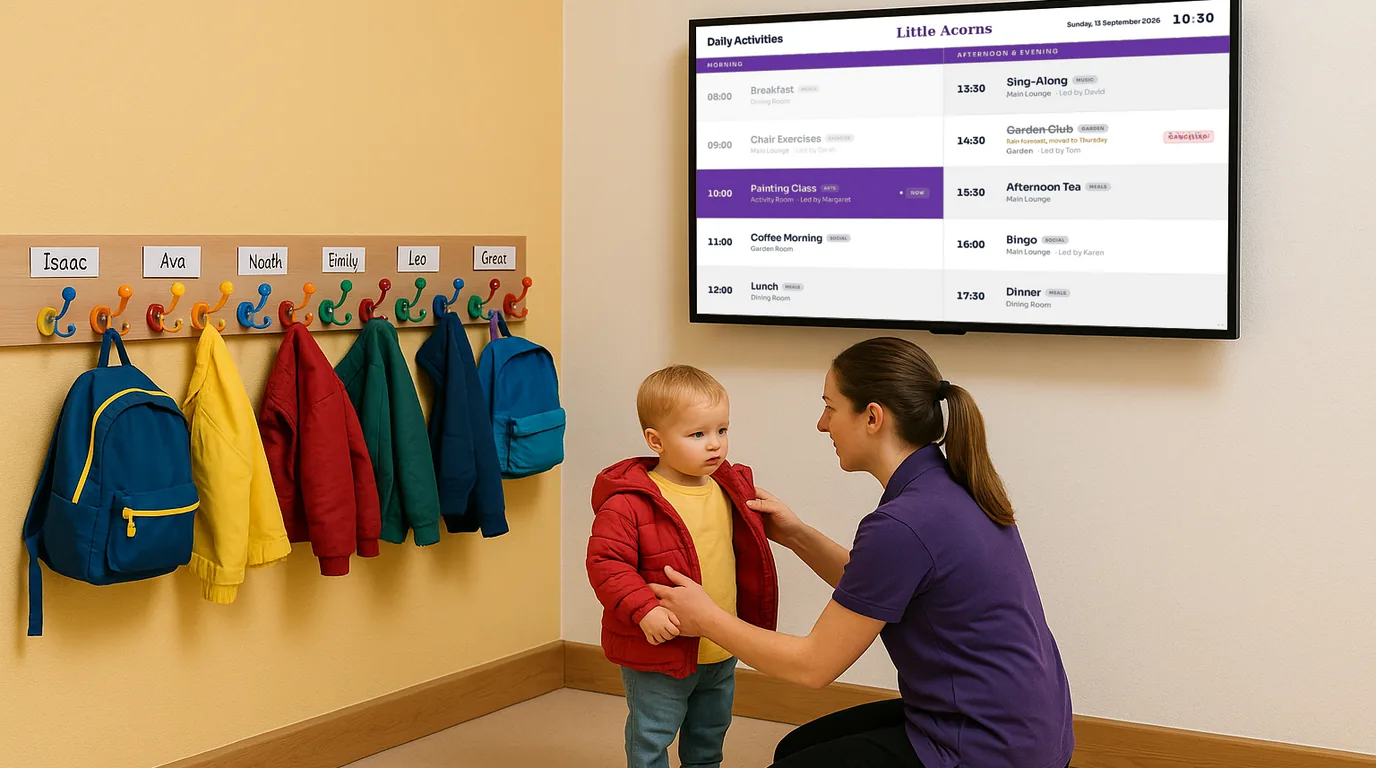
Nursery digital signage — keep parents informed from the moment they walk in
Display today's activities, the daily menu, allergy reminders and upcoming events on any screen in your nursery or early years setting. Update from your phone. Live in 15 minutes — no IT required.
No credit card required · Cancel anytime · From £10/Location/month
The problem
Parents drop off in a rush and miss everything on the noticeboard
Morning handover in a nursery or early years setting is one of the most information-dense moments of the day. In two minutes or less, a parent needs to know what is happening today, whether there is anything special to bring, and what their child will eat at lunch. Meanwhile, staff are managing arrivals, checking children in, and preparing the room.
Right now, most of that information lives on a paper noticeboard that parents walk past without stopping. The "what's for lunch today?" question gets asked repeatedly at the desk. The allergy reminder stuck to the kitchen door gets ignored until it matters. The forthcoming parents evening gets buried in a WhatsApp group message that half the families never scroll back to find.
A screen showing the right information at the right moment — in the entrance, at reception, in the corridor — changes the entire morning dynamic.
Why it matters
What poor communication costs your nursery every day
Handover slows down
"What's happening today?" "Is it library day?" "What are they having for lunch?" Every question during drop-off takes time away from the children and creates a queue behind the parent asking.
Allergy notices go unseen
A dietary reminder on a piece of paper stuck to the kitchen door is not robust enough. A visible, prominent display in the food preparation area protects children and demonstrates the rigour inspectors expect.
Events get low attendance
The settling-in session, sports day, parents evening — events that rely on family attendance suffer when the only communication route is a paper newsletter or a WhatsApp message lost in the scroll.
Parents feel less informed
When parents do not know what their child is doing or eating, it erodes confidence in the setting. Transparency about the day's programme builds the trust that leads to long-term enrolment.
The solution
Digital signage for nurseries that any member of staff can manage
NowBoard is digital signage software designed for schedules, notices and information displays — not video production or complex media management. Plug a NowBoard Player into any screen in your nursery and start displaying useful, up-to-date information for parents and staff within minutes.
Your nursery manager, room leader or administrator can update every screen in the setting from their phone, tablet or computer. When the menu changes, update it. When a session is cancelled, post a notice immediately. The right information, in the right place, visible to everyone who needs it.
-
Plug in a NowBoard Player
Use the NowBoard Player Pro (a dedicated HDMI device, £139) on any TV screen — at reception, in the entrance, in staff areas. Or use the NowBoard Player App on any Google Play Certified Android or Google TV device.
-
Add your content
Today's activities, the lunch menu, allergy reminders, upcoming events, staff room assignments. Use NowBoard's templates or build layouts that suit your setting.
-
Screens update instantly
Update the menu from the kitchen, post a last-minute notice from your phone, change the activity plan at the start of the day. Every connected screen refreshes automatically — no USB sticks, no printing.
Use cases
Six ways nurseries use NowBoard every day
Today's activities and learning themes
Parents know what their child is doing before they even sign in
A NowBoard entrance display shows today's learning focus, key activities, and any special sessions planned — forest school, a visiting musician, an outdoor play morning. Parents see it during drop-off and can have a conversation with their child later in the day based on what they were doing. For settings following specific early years frameworks, displaying the learning theme communicates the educational intent behind each day's programme to the families who fund it.
Daily menu display
Reassure parents about what their child is eating — every single day
NowBoard displays today's full menu — breakfast, morning snack, lunch, afternoon snack — prominently at reception and in the entrance area. Parents glancing at the screen during drop-off know immediately what their child will eat. When a menu item changes because of a delivery issue or seasonal substitution, update the screen in seconds. For settings with a kitchen cook, the display in the food preparation area ensures that all staff can see the confirmed menu before service begins.
Allergy and dietary reminder board
Visible to all staff as they prepare and serve food — every day
NowBoard displays allergy and dietary information where food is prepared and served. The current children attending, their specific requirements, and any session-by-session variations can be shown clearly on a screen that all kitchen and room staff can see. This is not a substitute for robust allergy management procedures, but it is a highly visible, always-current reference that reduces the risk of errors and demonstrates systematic care. Update it when a child's requirements change.
Upcoming events countdown
Settling-in sessions, sports day, parents evening — visible weeks in advance
NowBoard displays upcoming events as a rolling board in the entrance area — settling-in sessions, parents evenings, open mornings, special themed days, sports day, end-of-year celebrations. Parents see the calendar during drop-off and collection, giving them weeks of notice rather than a WhatsApp message the day before. Update the display as new events are confirmed. Pin a special notice for high-priority dates that need maximum visibility.
Staff and room assignment board
Which key worker is in which room today — visible at a glance
NowBoard displays the day's room assignments — which staff member is in the baby room, the toddler room, the pre-school room — along with any cover arrangements or temporary changes. For parents picking up, knowing who their child has been with all day matters. For staff arriving for a shift, the assignment board in the staff entrance or break room removes ambiguity about where they are needed. Update it each morning when the rota is confirmed.
Collection time reminders and special notices
Important operational notices visible throughout the day
NowBoard displays collection time reminders, holiday closure dates, fee payment reminders, and any urgent notices. For settings with staggered collection times by age group, a clear display in the car park area or entrance prevents parents arriving at the wrong time. For urgent notices — a sudden closure, an outbreak of illness requiring specific guidance — update the screen immediately and know that every parent who walks through the door will see it.
Why NowBoard
Why nurseries and early years settings choose NowBoard
Most digital signage systems are designed for retail or corporate environments — complex to configure, expensive to run, and dependent on technical skills that busy nursery staff do not have. NowBoard is built for small teams where the person managing communications is also doing the morning register.
Update from your phone
The menu changed this morning? Update the screen from the kitchen before the first parents arrive. A session is cancelled? Post a notice before drop-off. NowBoard is designed to be updated by the people who run the setting.
Works on screens you already have
Any TV with an HDMI port becomes a NowBoard display. The NowBoard Player Pro (£139) plugs straight in. The NowBoard Player App works on existing Android TV devices. No new hardware purchase required to get started.
Multiple screens, one dashboard
Reception screen, kitchen screen, staff room display — manage them all from the same dashboard. Each screen can show different content. Update one or all of them at once.
No IT skills needed
If your team can use a smartphone, they can use NowBoard. No training courses, no technical manuals. New staff can learn it in minutes. There is nothing to install on nursery computers.
Works offline
Nursery wifi can be unreliable. If the connection drops, NowBoard screens keep showing the last update. When the connection returns, they sync automatically. Screens never go blank.
From £10/Location/month
Pay per Location, not per screen. Unlimited screens showing the same content in one building count as one Location. No setup fees, no annual contracts. See pricing.
Getting started
Get your nursery's first screen live in under 15 minutes
-
Sign up for a free trial
No credit card, no commitment. Try NowBoard with a single screen to see how it fits your setting before rolling out further.
-
Connect your player
Plug the NowBoard Player Pro into the HDMI port on your reception or entrance screen. Or install the NowBoard Player App on an existing Android TV device. Connect to your wifi.
-
Scan the QR code and add your content
Scan the on-screen QR code to pair the device with your account. Add today's menu, the activity plan, and any notices using NowBoard's ready-made templates.
-
Go live
Your screen starts displaying content immediately. Most nurseries have their first screen running well within 15 minutes of opening the box.
FAQ
Common questions about nursery digital signage
Is the content appropriate for young children?
NowBoard doesn't show content to children — it's designed for parent and staff-facing screens at reception, in corridors, and staff areas. The displays carry operational information for adults: menus, activity plans, allergy reminders, event notices, and staff communications.
Can we show photos of the children?
Yes. You can upload images to create a noticeboard-style display — for example, showing photos from a recent trip or activity. Ensure you have appropriate photo consent for any child images before displaying them on any screen, in line with your setting's safeguarding and data protection policy.
Can different staff members manage different screens?
Yes. NowBoard supports multiple users with role-based access. The nursery manager has full control. The kitchen lead can update the menu display. The room leader can post session notices. Nobody accidentally changes something they should not.
We run two rooms — do we need two subscriptions?
Only if each room needs to show different content. If both rooms show the same content, they count as one Location. If the baby room and the pre-school room show different menus or activity plans, that is two Locations at £10/month each.
Is there a minimum contract?
No. NowBoard is month-to-month from £10 per Location. No setup fees, no annual lock-in. Add Locations as your setting grows.
Give parents the information they need — without slowing down the morning
Your parents care deeply about what their child is doing and eating today. Your staff have enough to manage without answering the same questions at every drop-off. A screen showing the right information at the right moment solves both problems at once.
No credit card required · No IT required · From £10/Location/month