
Car dealership screens: what to show in the showroom and service area
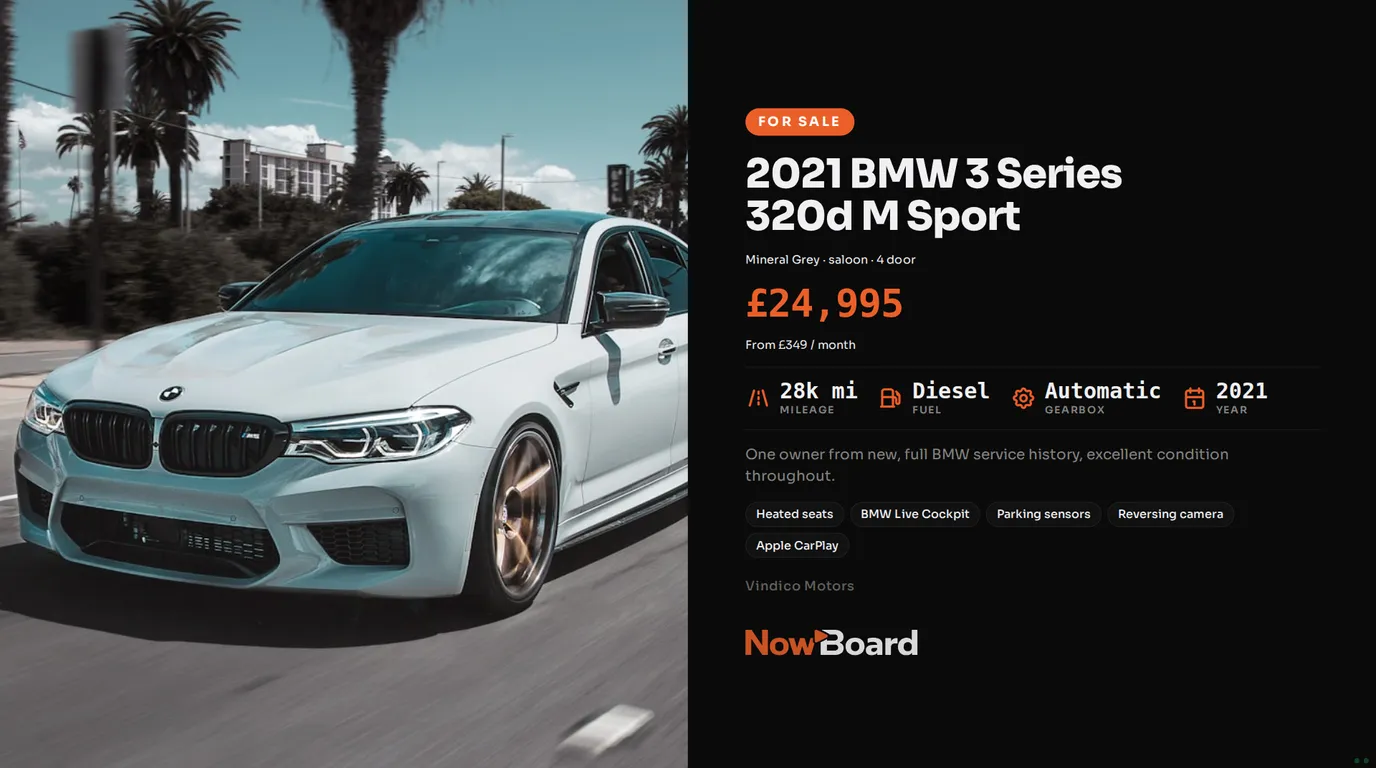
Car dealership screens earn their place when they show the stock you have today, at today's price. This guide covers what to put on screens in the showroom, the window and the service area, how to lay out a car so visitors read it, and how to keep the stock on screen current without printing a new card for every price change.
Why printed cards fall behind
A dealership changes its stock every week. Cars arrive, prices drop, finance offers change at the end of the month, and a car that sells on Friday still has its card in the window on Monday. Each change means somebody prints a card and walks it to the car or the window. With several sites, that work happens at every site.
A screen shows the same information as the card, with a large photo, and it changes when the stock changes. That is the main reason to put one in.
What to show on a car
A visitor looks at a car on screen for a few seconds. Give them the facts they compare first:
- Year, make, model and variant as the headline.
- The price, large, and the monthly figure under it if you offer finance.
- Mileage, fuel, gearbox and year as four short facts.
- One good photo. A front three-quarter view in daylight works best.
- Three or four features, such as heated seats or a reversing camera.
The NowBoard Vehicle Listing Board lays a car out this way, with the photo on one side and the details on the other. There are also a gallery layout, which cycles through the photos of one car, and a grid of three cars for the showroom floor.
Ideas for each part of the dealership
Showroom window
Cycle through your newest stock, one car per slide. New cars carry a "New In" badge for 14 days by default, so people who pass often see what has just arrived. Set display hours on the window Channel so the screen runs into the evening and then switches off.
Showroom floor
Use the grid of three cars beside similar cars on the floor, so a visitor who likes one hatchback sees two others. Star one car to show it as Car of the Week, and add a badge such as Reduced, Just In or 0% APR.
Test drives and part exchange
Add a QR Code slide that opens your test drive or part-exchange form. A visitor can book on their phone without waiting for a salesperson.
Service reception
Customers who wait for their car have time to read. Show your sales and service hours, seasonal service offers and your team. Give each offer an end date, so it leaves the screen on time.
For example
You could put a portrait screen at the entrance of each site with the newest stock, a landscape screen on the showroom floor with the grid of three, and a screen in service reception with hours and a winter check offer. When a car is reserved, the sales team changes its status in the stock sheet, and every screen shows Reserved at the next update.
Keeping stock current
In NowBoard, cars live in Vehicle listings. They can get there in three ways:
- From a Google Sheet. Publish the sheet as CSV and add it as a Data Source. NowBoard reads it on a schedule and fills your Vehicle listings. Add a row and the car appears. Delete the row and it leaves the screen.
- From a CSV file or an API. If your dealer system can export stock to a CSV file on the web, or you have an API, a Data Source reads that in the same way.
- Typed in. Add a car from your phone. You need the make, the model, the year and a price before you can save it.
NowBoard does not connect to dealer systems or the car sales websites directly, so the sheet or the file is the link between your stock and your screens. For a group, keep one sheet so every site shows the same stock, or give each site its own tab with its own Data Source so each showroom shows its own cars.
When one car needs a change that the sheet must not overwrite, such as a corrected price, add an override in NowBoard. The sheet stays as it is.
Choosing the screens
NowBoard works with any screen that has an HDMI port. Plug a NowBoard Player into it and pair it with the QR code on the screen. Inside the showroom, a normal TV is bright enough. A screen that faces the street through a sunny window needs more brightness: most home TVs give 300 to 500 nits, and screens made for shop windows are usually 2,500 nits or more.
If the connection drops the screen keeps showing the last Board it loaded.
Before you go live
- Check that each car in the sheet has a price, a mileage and a photo address.
- Pick the layout for each screen: one car, a gallery, or a grid of three.
- Add your logo and colours to each Board.
- Test the QR code with your own phone.
- Look at the window screen from the forecourt at midday.
Cost and next steps
Listing Boards and Data Sources need Starter or above. The Free plan covers one TV with no card and no expiry, for hours and offers, but it does not include the vehicle listing templates. Starter costs £10 a month per TV, ex VAT, and includes 3 Data Sources. Professional, at £20 a month per TV, ex VAT, includes 15. The pricing page has the details. See car dealership digital signage for the Boards, or book a demo to plan screens across your sites.
See it on your own screens
We show you NowBoard with the Boards for your kind of place. Or sign up free.