
A digital calendar display for every screen in your building
Show your Google Calendar or Outlook calendar on the TVs in reception, outside meeting rooms and in the staff room. Change an event in the calendar and the screens follow, with nobody typing it in twice.
No credit card required • Cancel anytime • Calendar feeds from £10/TV/month ex VAT
- Google and Outlook Sync any calendar with an iCal address.
- Rooms, timetables, events Send events to the list that fits the screen.
- Works with your TVs Any TV with HDMI and a NowBoard player.
- From £10 a month Per TV, ex VAT. One TV is free.


The calendar is right. The sign on the wall is not.
Most organisations already keep their bookings, classes and events in a shared calendar. The trouble starts when the same information has to go on a whiteboard, a printed sheet or a screen as well. Someone has to copy it across, and when a meeting moves or a class is cancelled, the copy on the wall is the last thing to change.
A digital calendar display fixes that by reading the calendar itself. The calendar stays the one place where people make changes, and every screen shows what it says.
Connect a calendar once, then leave it alone
Copy the calendar's iCal address
Google Calendar, Microsoft 365 (Outlook) and most other calendar apps give each calendar a private iCal link. Copy it from the calendar's settings.
Paste it into a calendar feed in NowBoard
Choose where the events go: a Room (its bookings), a Timetable (classes and sessions) or an Events list (what's on).
Put the Board on your screens
Pick a Board that shows that Room, Timetable or Events list. NowBoard checks the calendar about every 15 minutes, and the screens update on their own.
NowBoard copies each event's title, start and end time, place and description, and it handles repeating events and time zones. It reads the calendar only. It never writes back to it, so your calendar stays exactly as it is.
What a digital calendar display can look like
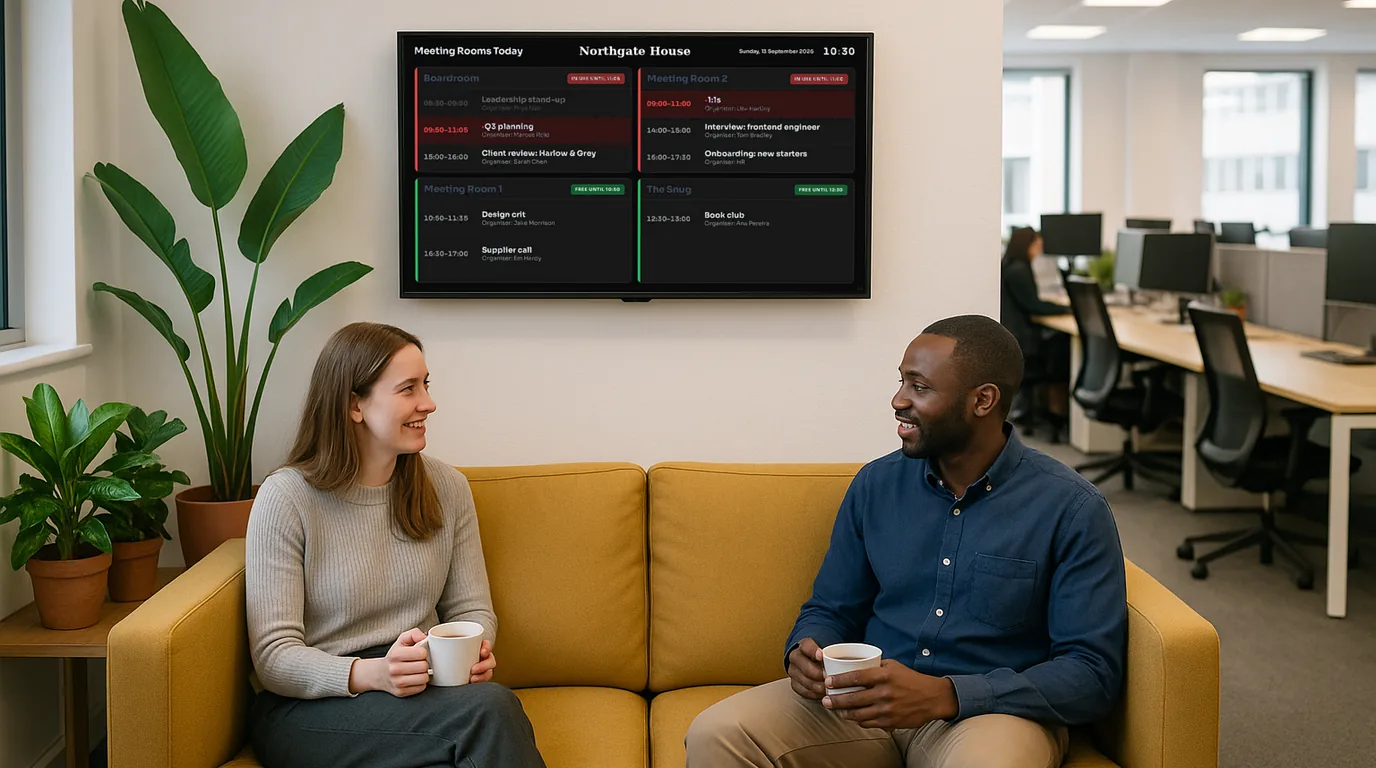
These are real NowBoard Boards. Add your calendar, your logo and your colours.
A digital wall calendar for offices, schools and venues
Offices: room bookings beside the door
Connect each room's Outlook or Google calendar and show today's bookings outside the door, or every room on one screen in reception. See meeting room displays.
Schools and colleges: the day's timetable
Feed a shared calendar into a Timetable and show today's sessions in the corridor or staff room. See class timetables.
Gyms and leisure centres: classes that change
When the class calendar changes, the timetable screen in the foyer changes with it, so members see the class that is actually running.
Churches, clubs and community venues: what's on this month
An Events list shows up to 90 days ahead, so the entrance screen can show what is coming up as well as what is on today. See event signage.
Care homes: today's activities next to the day and date
Put the activities calendar in a Playlist with a large day and date clock. See the dementia day clock.
A digital calendar display without a new device on every wall
Use the TVs you have
Any TV with an HDMI input works with a NowBoard player. You do not need a special calendar screen. See digital signage screens.
More than a calendar
The same screen can show notices, a welcome message, menus or the weather between calendar Boards, all on one Playlist.
Hand-typed events still work
No shared calendar yet? Type events in by hand. If you connect a calendar later, events you typed yourself stay as they are.
Clear pricing
Calendar feeds come with the Starter plan (one feed) and the Professional plan (five feeds), priced per TV per month. See pricing.
Common questions about digital calendar displays
Which calendars work?
Google Calendar, Microsoft 365 and Outlook, and any calendar app that can publish an iCal address. A link that starts with webcal:// also works.
How quickly do changes show on the screen?
NowBoard checks each calendar about every 15 minutes. If you need a change to show at once, press the refresh button next to the feed.
Can people book or edit events from the screen?
No. The screen shows the calendar. People keep making bookings and changes in Google Calendar or Outlook, as they do now.
Is a digital calendar display included in the Free plan?
The Free plan runs one TV, and you can type events in by hand. Connecting a calendar needs the Starter or Professional plan.
Is this a family wall calendar?
No. NowBoard is built for organisations: offices, schools, venues and care homes with screens that many people read. It can show a calendar on a TV at home, but it does not have family features such as chore charts or photo slideshows from a phone.
Put your calendar on the wall
Start on the Free plan with one TV, then connect your calendar when you are ready.
No credit card required • Cancel anytime • From £10/TV/month ex VAT