
Construction site digital signage: the same notices in every site cabin
Nobody knows which poster is on which site. Put safety notices, inductions and site news on every cabin screen, changed from one place.
Free on one screen, with no card. Then from £10 per TV a month, ex VAT. No contract.
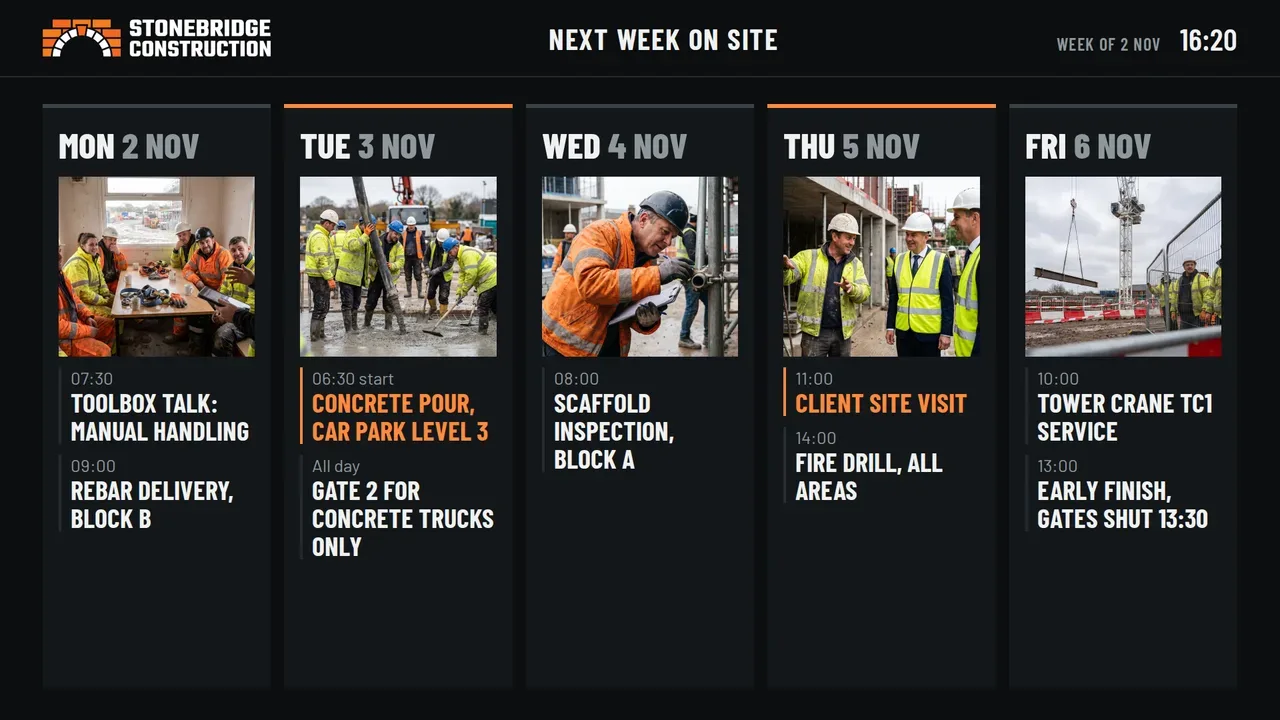
- Works with your TVs Use a TV in each site cabin with a NowBoard Player.
- From £10 a month Per TV, ex VAT. One TV is free.
- Safety notices Change a notice once and every site shows it.
- Induction QR codes New starters open the induction on their phone.
- Emergency alerts One alert on every site screen, on Professional.
The problem
Paper notices do not keep up with live sites
Safety notices
Which version is on which site?
The laminated poster was right when it went up. A rule changes, and every site needs a new copy.
Inductions
New starters arrive every week
Each one needs the same induction steps and the same site rules, on every site.
Site news
Today's plan lives on a phone
Deliveries, crane lifts and road closures sit with the site manager, not where the gangs can see them.
Sites open and close
A new site starts with a blank wall
Someone has to print and put up every notice again. When the job ends, the cabin moves on.
Board previews
Live sample Boards for the site cabin
These are working Boards. Type in your own rules, notices and induction link.


How it works on one site
One screen in the cabin, kept up to date
Safety notices
Notices with a start and an end date
Write each notice once as an Announcement. Give it a priority and dates. It leaves the screen on its end date.
Inductions
A QR code for the induction
Show a QR code that opens your induction form or video, so a new starter can begin on their phone.
Site news
Today's plan, changed from a phone
The site manager adds deliveries, lifts and closures from the NowBoard Operator App. It installs from your browser on phone, tablet or desktop.
Weather and milestones
Weather and a countdown
Weather Boards use the location of the Site. A countdown Board counts down to a date you choose.
Evacuation
An alert on every screen
On Professional, an emergency alert stops the usual content and shows an urgent message. It goes to one Channel, one Site or every Site.
Contractors with many live sites
The right notices on a new site on day one
Put your company rules and safety notices in one Playlist. Use that Playlist on the Channel of every site. Change a Board once, and every site shows the change.
Open a new site, and give its Channel the same Playlist. Its screen shows the right notices from the first day.
A Board can be in more than one Playlist. To add a site's own plan, give that site a Playlist with the shared Boards and one Board of its own.
When a job ends, move the screen to the next site. You can assign a Player to a different Channel at any time.
Group each site's screens into a Site. Sites need Starter or above. Contractors with many sites can book a 30 minute demo to plan the roll-out.
Costs
What it costs
You pay per TV, per month, with no setup fee and no annual contract. Starter is £10 per TV per month ex VAT, and Professional is £20 per TV per month ex VAT.
For example, 10 sites with 2 screens each is 20 screens. On Professional that is £400 a month ex VAT.
NowBoard works with any screen that has an HDMI port. Plug a NowBoard Player into the screen. It costs £149 ex VAT, UK only.
The Free plan runs one TV with up to 5 Boards, with no card and no expiry. Emergency alerts need Professional. See pricing for every plan.
Use cases
12 things your screens can do
- Welfare cabin screenSite rules and PPE.
- Site office screenNext week's plan.
- Canteen screenThe safety record.
- Gate screenVisitor sign-in.
- Urgent site noticeClose a zone in seconds, on every screen on site at once.Made with Announcements
- First aiders and marshalsShow who to call, with faces, so new workers find help fast.Made with People
- We're hiringShow open roles, pay and a QR code, so your workforce can refer people.Made with Job Vacancies
- Trade safety leagueRank trades by safety observations and make good habits a friendly contest.Made with Ranked lists
- Handover countdownCount down to handover so every trade sees the deadline each day.Made with Countdowns
- Training videoPlay short safety videos in the canteen during breaks.Made with YouTube
- Waste and recyclingShow waste figures and recycling against your target as the month goes on.Made with Live figures
- Welcome and birthdaysWelcome new starters by name and mark birthdays across the site.Made with Dates for people
For any venue
3 Boards that work everywhere
- Photo slideshowShow your own photos: the team, the venue, last weekend’s event.Made with Photo Albums
- VideoPlay your own videos or a YouTube link, full screen or beside other content.Made with Media
- Local weatherToday’s weather and the next five days for your town, updated on its own.Ready-made Board
FAQ
Common questions about construction site digital signage
Does the screen need internet in the cabin?
Yes. Each screen needs an internet connection, by Wi-Fi or a network cable. Check how each cabin connects before you fit a screen.
Can we move a screen to a new site?
Yes. Take the screen and its Player to the new site, and assign the Player to that site's Channel. It shows that site's Boards.
Can head office and the site both change it?
Yes. Head office keeps the shared Boards for every site. Each site manager changes their own site's Board from a phone.
Do we need new screens?
No. Plug a NowBoard Player into the HDMI port of a TV you already have.
Is there a minimum contract?
No. You pay month to month and can add or remove TVs as sites open and close.
The same notices on every site
Start free on one site cabin screen. Contractors with many sites can book a 30 minute demo.
No card, no contract · UK-based support · From £10/TV/month ex VAT