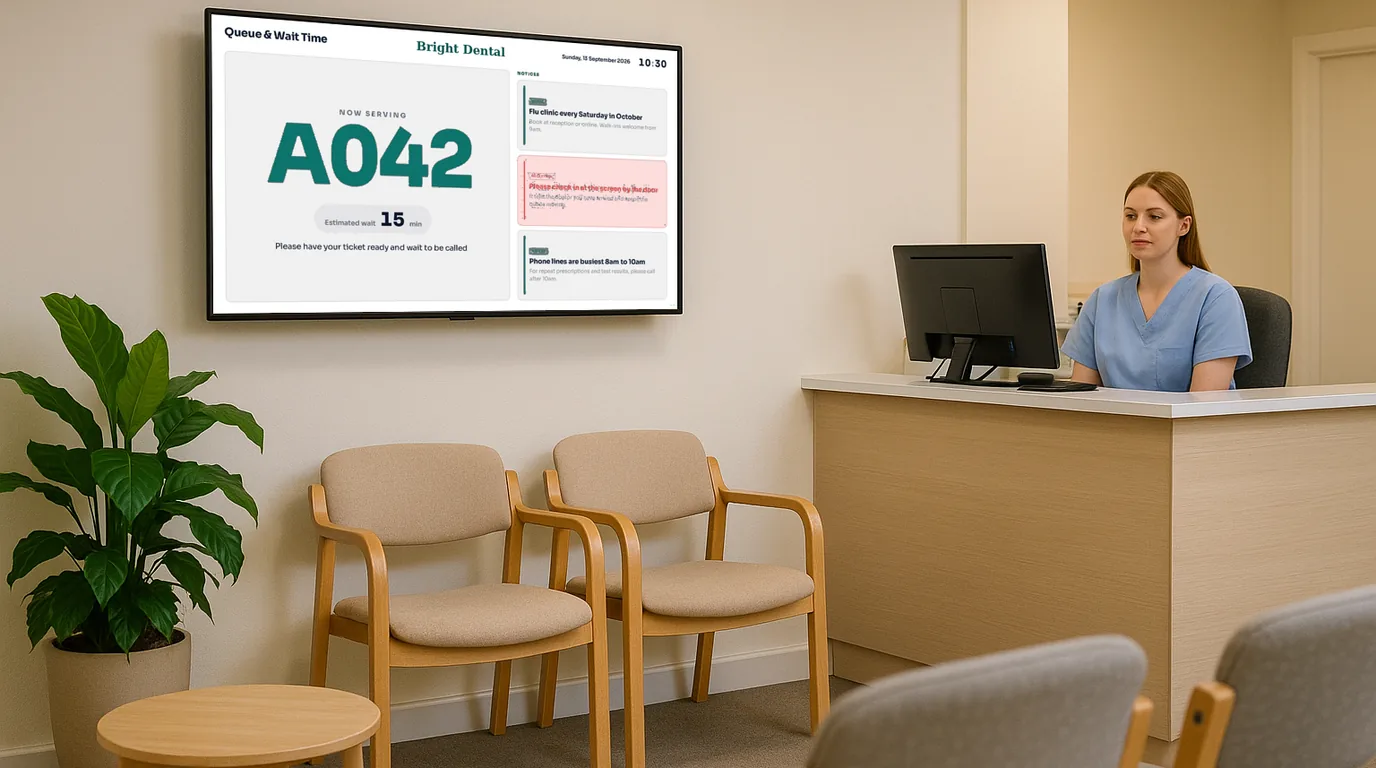
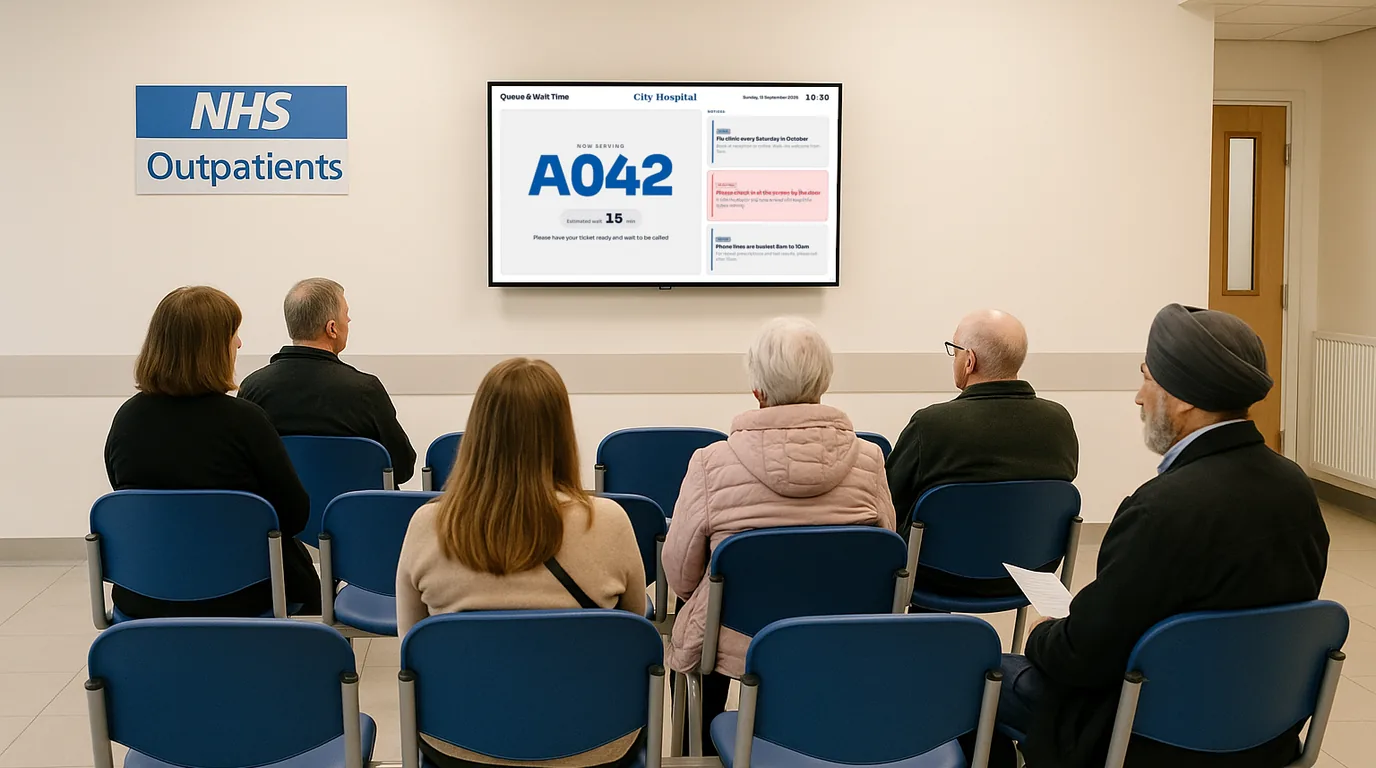
Dental and clinic waiting room displays — calm, professional screens that inform without overwhelming

Replace the daytime TV nobody asked for with purposeful, on-brand screens that reduce perceived wait times, inform patients, and promote your practice professionally. Live in 15 minutes, no IT required.

No credit card required  ·  No IT required  ·  From £10/Location/month

The problem

The TV is on a daytime chat show. The noticeboard has not changed since 2019. And nobody has time to update it.

Most dental and clinical waiting rooms have a television. It is usually tuned to whatever was on when somebody switched it on years ago — daytime TV, rolling news, or a property show nobody in the waiting room chose to watch. Patients sit with their phones out, ignoring it.

The noticeboard on the wall has a printed leaflet about an NHS dental scheme that ended, a reminder about the cancellation policy, and a certificate from 2021. Nobody updates it because there is no easy way to update it. Printing and laminating a new sheet requires time nobody has between appointments.

Meanwhile, your practice offers teeth whitening, Invisalign, hygienist appointments, and a new patient referral scheme — but patients have no idea because the waiting room is not doing any work for you. A screen that displays what you choose, updated when you choose, costs less per month than a single routine appointment and does more for your practice than a television showing Loose Women.

Why it matters

The real cost of an uninformed and unengaged waiting room

Dental anxiety is worsened by uncertainty

Patients who do not know how long they will wait feel more anxious. A screen that acknowledges delays and provides useful information measurably reduces perceived waiting time and patient stress.

New services go unnoticed

You added teeth whitening six months ago. Your hygienist has new availability. The practice offers NHS and private appointments. Patients who have been coming for years do not know because nothing in the waiting room tells them.

Receptionists answer the same questions repeatedly

"How long will I be waiting?" "Do you do dentures?" "What is your cancellation policy?" Every question a screen could answer is 30 seconds your receptionist spends not booking appointments or handling urgent calls.

Multi-practice groups lack consistent brand experience

A dental group with eight practices has eight different waiting room TV channels, eight different noticeboards, and no consistent brand experience. Patients at different sites have entirely different experiences of the same brand.

The solution

Waiting room digital signage for dental and clinical practices — professional, calm, always current

NowBoard is digital signage software designed for teams that want to control what appears on their screens without needing a designer, an IT department, or a content agency. Plug a NowBoard Player into any TV in your waiting room and replace the default television with content that works for your practice.

Your practice manager, receptionist, or any member of the admin team can update the screen from their phone or desktop. No technical knowledge required. Content that should change seasonally — health tips, promotions, public health campaigns — gets updated in minutes rather than months.

  1. Plug in a NowBoard Player

    The NowBoard Player Pro (£139) connects to the TV in your waiting room via HDMI and uses your practice wifi. No specialist installation required. The whole setup takes under 15 minutes.

  2. Add your practice content

    Practice information, clinician schedules, service promotions, health awareness content, and patient guidance. Use NowBoard's templates or upload your own branded materials. Your practice logo and colour scheme, not a generic template.

  3. Update from your phone or desktop

    Dr Smith running ten minutes late? A new hygienist joining the team? Change anything from the NowBoard app or dashboard. The screen in the waiting room updates immediately. No IT support call, no USB stick, no waiting.

Use cases

Six ways dental and clinical practices use NowBoard

Today's clinician schedule

Let patients know which clinician they are seeing and acknowledge any delays before they ask

NowBoard waiting room displays can show today's clinicians, their surgery numbers, and any current running times. When Dr Smith is running ten minutes behind after an extended procedure, update the screen in 30 seconds from the reception desk. Patients see the update without having to ask — which reduces the number of "how long will I wait?" conversations at the front desk significantly. For practices with multiple dentists, show a simple summary of who is on and where they are working today.

A four-dentist practice in Manchester added a NowBoard screen showing the day's clinicians and an approximate running time. Reception reported a noticeable drop in patients approaching the desk to ask about their wait within the first week. The team updates the running time estimate as appointments shift.

Practice information board

The answers to every question your receptionist gets asked ten times a day, on screen

Opening hours. NHS and private appointment availability. Emergency contact numbers. Payment options. Cancellation policy. New patient registration process. All of this can live on a rotating NowBoard display that patients read while they wait — before they need to ask. For physio, chiropractic, and private clinics, add information about the conditions you treat, the clinicians you have, and how to book a follow-up. The screen does the explaining so your team can focus on the work that requires a human.

Health awareness content rotation

Seasonal health tips and public health information that you control and can update when guidance changes

Many practices want to display health awareness content — oral hygiene reminders, NHS screening information, seasonal health tips, mental health signposting — but the noticeboard never gets updated when the guidance changes. NowBoard lets your practice manager update health awareness content from their phone in minutes. Run an oral health campaign in Children's Dental Health Month. Switch to hay fever advice in spring. Display flu vaccination reminders in autumn. Content that used to require a poster order and a member of staff with a staple gun now takes a minute on a phone.

A GP surgery in Edinburgh uses NowBoard to rotate seasonal health content through the waiting room screens. The practice manager updates the content monthly, usually in under five minutes. Patients regularly comment that the information is useful and current.

Payment and referral information

Explain your fees, payment options, and referral process before patients reach the reception desk

A significant portion of waiting room conversations at the reception desk are about fees and payment. How much is a private check-up? Do you accept monthly payment plans? How does NHS treatment charging work? What happens if I need specialist treatment? NowBoard gives you a screen to explain this clearly and professionally before the patient gets to the desk — reducing awkward surprises and freeing your reception team to process payments rather than explain them from scratch each time.

New patient welcome screen

Make your first-timers feel expected and informed from the moment they arrive

New patients often arrive anxious, unsure what to expect, and uncertain about how the practice works. A NowBoard welcome display tells them what to do when they arrive, what their first appointment will involve, what to bring, and how the check-in process works. For nervous patients, particularly children, seeing a calm, professional screen that explains what is going to happen reduces anxiety before the appointment starts. It is a small detail that makes a first impression.

A private dental practice in London shows a dedicated new patient welcome sequence on their waiting room screen, including a brief "what to expect at your first visit" message and an introduction to the practice's clinical team by name and photo. New patient questionnaire completion rates improved after implementation.

Multi-practice management for dental groups

Consistent brand experience across every site, managed from one place

Dental groups and corporate dental chains often struggle with inconsistency across sites — different TVs, different noticeboards, different patient experience at each location. NowBoard gives a group-level administrator control of the content that appears across all sites: group-wide promotions, NHS changes, new treatment introductions, policy updates. Each site can also manage its own local content — today's clinician, site-specific opening hours — independently. One dashboard, consistent brand, local flexibility. Learn more about multi-site management.

Why NowBoard

Why dental and clinical practices choose NowBoard

Most digital signage platforms are built for advertising or retail. NowBoard is built around the schedules, notices, and information boards that health and wellness practices actually need — without requiring a designer or a content team.

Professional and calm by default

NowBoard templates are designed to look clean and professional in a clinical environment — not bright, promotional, or retail-style. The tone matches the setting. You can also upload your own branded materials.

Reception staff can manage it

No IT involvement, no design agency, no waiting for someone to update it. If your receptionist can send an email, they can update a NowBoard screen. Training takes minutes, not hours.

Works on the TV you already have

Plug the NowBoard Player Pro (£139) into the HDMI port of the waiting room TV. No new screens, no installation, no contractor. You own the content from day one.

Update from your phone

Running late? New team member? Seasonal health campaign? Update your waiting room screen from your phone in seconds. The change appears immediately — no USB sticks, no remote desktop sessions.

Multi-practice control for dental groups

Group-wide content pushed to all sites from one dashboard. Each site manages its own daily information independently. Role-based access means the right people control the right screens. Perfect for corporate dental groups and multi-site private practices.

From £10/Location/month

A single-site practice typically needs one Location. Multi-site groups are priced per Location. See pricing. No setup fees, no annual lock-in, cancel any time.

Getting started

Get your first practice screen live in under 15 minutes

  1. Sign up for a free trial

    No credit card, no commitment. Create an account and access the NowBoard dashboard immediately.

  2. Connect a player to your waiting room TV

    Plug a NowBoard Player Pro into the HDMI port and connect to your practice wifi. Or install the NowBoard Player App on an existing Android or Google TV device. The screen pairs in seconds.

  3. Add your practice content

    Start with practice information, your opening hours, or today's clinician schedule. Choose a clean template that matches your brand colours and add your practice logo.

  4. Go live and keep it current

    Your waiting room screen starts displaying immediately. Update it any time from your phone or the dashboard. Most practices have their first screen live well within the 15-minute mark.

FAQ

Common questions about waiting room digital signage

Is health content regulated? Do we need approval to display health information?

NowBoard displays whatever content you add — you have full control of what appears on your screens. We do not provide clinical content, health information, or NHS guidance. You upload your own approved materials, in the same way you would produce a waiting room leaflet or poster. If your practice has a process for approving patient-facing health information, the same process applies to what you put on your NowBoard screen. We provide the screen platform; the content responsibility is yours, as it is for any other patient-facing material.

Can we show the estimated wait time for patients?

Yes. You can display a manually updated wait estimate — for example, "Dr Smith is currently running approximately 10 minutes behind." Your reception team updates this as appointments progress. Real-time integration with appointment management systems such as SystmOne, EMIS, or SOE is on our product roadmap. For most practices, the manual update takes under 30 seconds and is sufficient to meaningfully reduce the number of "how long will I wait?" questions at the front desk.

Do we need a new TV?

No. NowBoard works on any TV with an HDMI port — which includes virtually every television manufactured in the last 15 years. Plug the NowBoard Player Pro (£139) into the existing waiting room TV and you are ready to go. If you have a TV already, you do not need to buy anything else to get started.

Is it GDPR-compliant? We cannot display patient names publicly.

NowBoard is used for general practice information, not patient records. You control the content entirely — your team would not display patient names or personal data any more than they would write them on a waiting room noticeboard. The platform itself does not process patient data; it displays the content you choose to add through the dashboard.

We have multiple practices — can one person manage all of them?

Yes. NowBoard supports multi-site management from a single account. A group-level administrator can push content to all practice screens simultaneously or manage each site independently. Individual practice managers get access only to their own site. See pricing for multi-Location plans.

Ready to replace the daytime TV?

Your patients deserve a waiting room that informs and reassures rather than ignores them. Your reception team deserves fewer repetitive questions. Your practice deserves a professional first impression on every visit.

No credit card required  ·  Live in 15 minutes  ·  From £10/Location/month