
Estate agent window displays you update from your phone
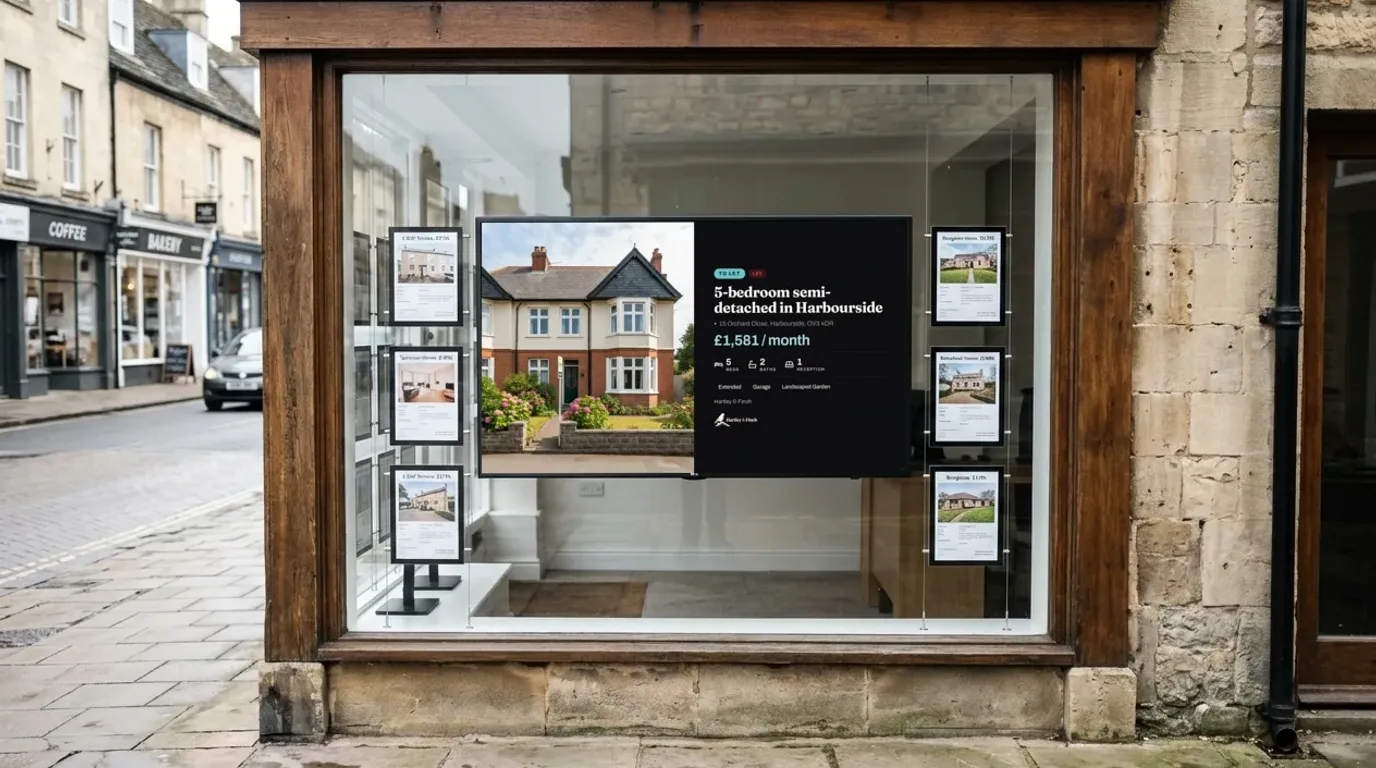
Update one Google Sheet. Every branch window changes. Show new listings, price changes, sold and let, and valuation offers on the TVs in your windows, and keep them current after the branch closes.
Start free on one screen. Listing Boards from £10 per TV a month, ex VAT. No contract.
- Works with your TVs Use window and reception TVs with a NowBoard Player.
- From £10 a month Per TV, ex VAT. One TV is free.
- Listings from a sheet Read a Google Sheet, CSV or API on a schedule.
- Property of the Week Star a listing to feature it in the window.
- Valuation QR codes Passers-by book a valuation after hours.
The problem
Why a screen beats printed cards and LED pockets
A sale is agreed on Tuesday, and the window still says "Just listed" on Saturday. Every price change means a new card, a trim and a trip into the window. LED pockets light the card up, but somebody still has to print it and swap it.
A screen in the window shows the same homes, with large photos, and changes when your listings change. Mark a home sold or under offer and the window shows it at the next update. Nobody climbs into the window display.
Board previews
Templates for the window and reception
Pick a listing Board for the window and add your logo and colours. There are three listing layouts: one large home, a photo gallery, or a grid of three homes.
How listings get on screen
One sheet, every branch
Keep your listings in a Google Sheet, a CSV file on the web, or your own API. A Data Source reads it on a schedule and fills your Property listings. Add a row and the home appears in the window. Delete the row and it leaves the window. Change the status to sold and the window shows sold.
You choose how the sheet maps to the branches:
- One sheet for the group. Every branch window shows the same homes. Head office edits one sheet.
- One tab per branch. Each tab has its own Data Source, so each window shows its own homes. Head office still works in one spreadsheet.
NowBoard does not connect to your property software directly. If your software can export listings to a spreadsheet or a CSV file, the Data Source reads that export. You can also type a listing in from your phone, with its price, beds, baths, EPC rating and photos.
Listing Boards and Data Sources need Starter or above. Starter includes 3 Data Sources, read as often as every 5 minutes, so it suits one group sheet or up to 3 branch tabs. Professional includes 15, read as often as every minute. The Free plan does not include the property listing templates.
Use cases
What estate agents put on their screens
Window listings
Current homes for sale and to let
The window cycles through your listings with the price, beds, baths and the main photo. New listings carry a "New" badge for 14 days by default, and sold or let homes show their status.
Property of the week
Feature one home
Star a listing and the Board shows it as Property of the Week. You can also add a badge, change the headline, or hide a listing from the window without changing your sheet.
Valuations
Book a valuation after hours
Add a QR code that opens your valuation form. People who stop at the window at 9pm can book before they walk on.
Reception
Your team and your open days
Use a reception screen for the branch team, open house dates and a welcome for the buyer who has an appointment.
Ideas
Estate agent window display ideas
- Put the newest homes first, so people who pass every day see something new.
- Show one large photo per home. Small text is hard to read through glass from the pavement.
- Keep sold and let homes on for a few days, then hide them. They show that the branch sells.
- Add a QR code for valuations and for your full search.
- Use a portrait screen in a narrow window and a landscape screen in a wide one.
- Mix in a slide about the team or the local area between listings.
Screens
Window brightness and TVs
A home TV behind glass that faces the street can look dim in daylight. Most home TVs give 300 to 500 nits. Screens made for shop windows are usually 2,500 nits or more, so they stay readable in the sun. A home TV is fine for reception, and for a window in shade or for evening viewing.
NowBoard works with any screen that has an HDMI port. Plug a NowBoard Player into the screen. It costs £149 ex VAT, UK only. Set display hours on each Channel, so the window switches off at the time you choose.
If the connection drops the screen keeps showing the last Board it loaded.
Costs for a group
What several branches cost
You pay per TV, per month, with no setup fee and no annual contract. Starter is £10 per TV per month ex VAT, and Professional is £20 per TV per month ex VAT.
The Free plan runs one TV with up to 5 Boards, with no card and no expiry. It covers notices, offers and a Meet the Team Board on one screen, but not the property listing templates. Window listing Boards need Starter. See pricing for every plan.
Getting started
Set up your window display yourself
-
Sign up and choose Starter
Create your account online. Listing Boards need Starter, from £10 per TV a month ex VAT, with no contract.
-
Connect the window screen
Plug a NowBoard Player into the HDMI port and pair it with the QR code on the screen.
-
Add your listings
Type them in, or connect your Google Sheet, CSV file or API as a Data Source.
-
Pick a listing Board
Choose one home, a gallery or a grid of three, and add your logo and colours.
FAQ
Common questions about estate agent window displays
Can it pull listings from our property software?
Not directly. Export your listings to a Google Sheet or a CSV file, or give NowBoard an API address, and a Data Source reads it on a schedule. You can also type listings in.
How bright does a window screen need to be?
For a window in direct sun, use a screen made for windows, usually 2,500 nits or more. A home TV is fine in shade, at night and in reception.
Can each branch show its own listings?
Yes. Give each branch its own tab in the sheet, with its own Data Source. Or keep one sheet and show the same homes in every window.
What does it cost for several branches?
£10 per TV per month ex VAT on Starter. For example, 8 branches with 2 screens each cost £160 a month ex VAT.
Can we try listing Boards on the Free plan?
No. The Free plan does not include the property listing templates. Book a 15 minute demo to see them working, or start on Starter and cancel from your dashboard at any time.
Is there a minimum contract?
No. You pay month to month and can add or remove TVs whenever you like.
Put your window to work after you close
Groups with several branches: book a 15 minute demo to see listing Boards working. Or start free on one screen with notices and offers.
No card, no contract · UK-based support · From £10/TV/month ex VAT