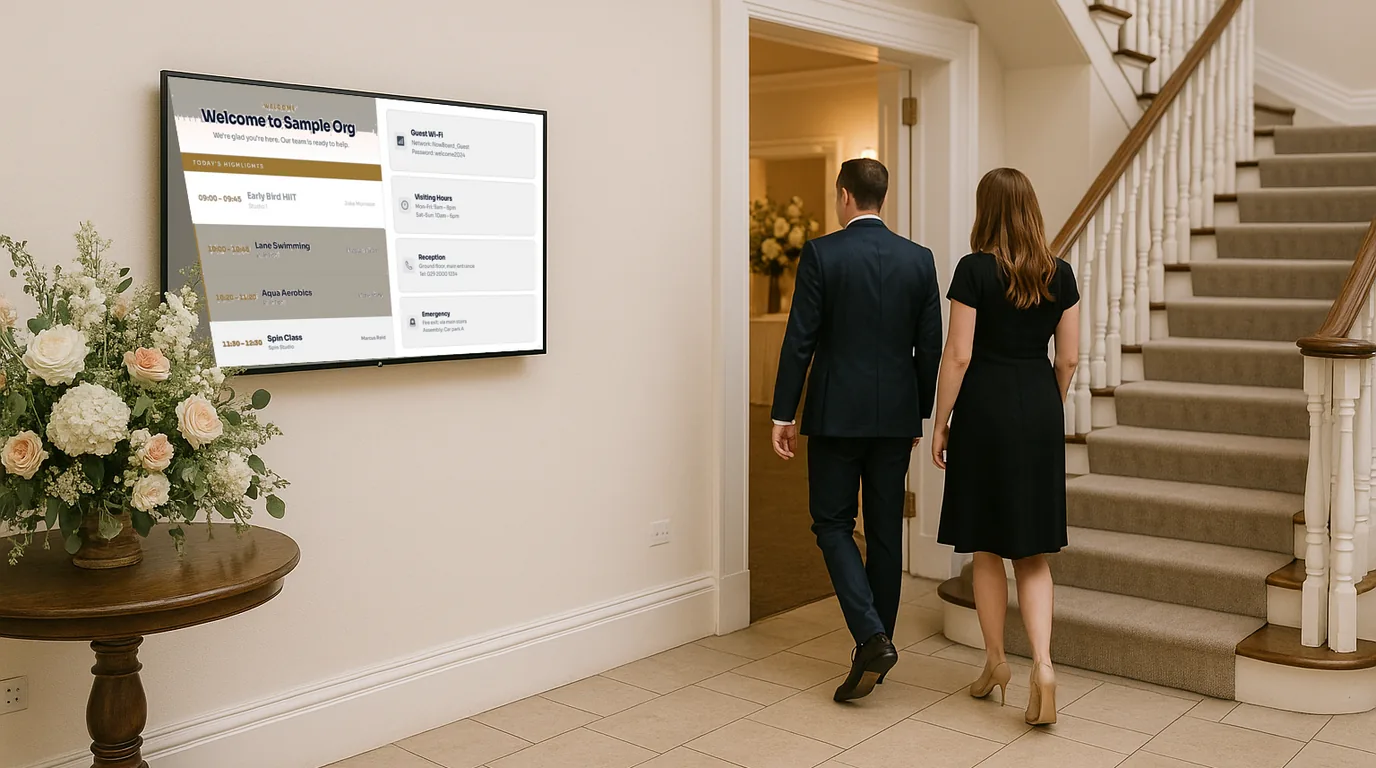
Wedding venue digital signage — professional screens that guide guests and elevate every event
Replace paper signs with personalised, branded displays that direct guests, display the Order of the Day, and make every event feel professionally produced. Update in seconds from your phone when plans change.
No credit card required · No IT required · From £10/Location/month
The problem
Paper signs look cheap in a premium setting. Guests get confused. Staff end up standing at junctions pointing people in the right direction.
You have spent months preparing a beautiful setting for an event that matters enormously to the couple paying for it. The flowers are perfect, the table settings are immaculate, and the catering is exceptional. Then guests arrive and the first thing they see is a printed A4 sheet in a clip frame on a stand, directing them toward the ceremony.
It is not that paper signs are wrong — it is that they are instantly visible as a compromise. In a setting that charges a premium and promises an exceptional experience, a piece of paper in a clip frame is a jarring note. And when the schedule changes, when the ceremony is running fifteen minutes late, when the drinks reception moves inside because of rain, that paper sign cannot be updated.
At that point someone on your team ends up standing at every junction, directing guests by hand, while the rest of the event continues without them. NowBoard gives you screens that look as considered as the rest of your venue — and that update in seconds when anything changes.
Why it matters
The real cost of paper signage at a premium venue
Couples chose your venue on reputation
Every detail of the day is under scrutiny. A clip-frame sign by the entrance is remembered. A beautiful, personalised screen with the couple's names is remembered differently — and it ends up in photos.
Confused guests default to stopping staff
Without clear, visible directional signage, guests stop the first person they see in a uniform. In a venue with multiple rooms and spaces, that means your team spends event time as informal tour guides rather than delivering the service they were hired for.
The Order of the Day is printed once
The timeline is printed the week before. If the ceremony runs late, if the band is delayed, if the speeches overrun — the printed programme is wrong before the day is half done. Guests are confused about what is happening when.
Back-to-back events need fast resets
Weekend venues often run Friday, Saturday, and Sunday events. Each one needs fresh, personalised signage. With paper, that means reprinting between events. With NowBoard, it means typing a new couple's names and date into the dashboard in under a minute.
The solution
Digital signage for wedding and event venues that your coordinator can manage on the day
NowBoard is digital signage software designed for event-driven content — schedules, timelines, directional information, and personalised displays. Plug a NowBoard Player into screens already installed at your venue and start displaying professional, personalised event signage within minutes.
Your event coordinator, venue manager, or wedding planner can update every screen from their phone during the day. When the ceremony runs late, when the seating plan changes, when the Order of the Day shifts — the screens update immediately, everywhere at once. No running between rooms, no replacing printed signs, no standing at junctions redirecting guests by hand.
-
Connect NowBoard Players to your venue screens
The NowBoard Player Pro (£139) connects via HDMI to any screen or display in your venue. If you have screens already mounted in your entrance hall, corridors, or event spaces, you are ready to go immediately. No AV contractor needed.
-
Set up each event the morning of
Add the couple's names and date, build the Order of the Day, set up directional signs for each space. Use NowBoard's templates or build branded layouts matching your venue's visual identity. Share a preview link with the couple or planner for sign-off.
-
Update from your phone as the day progresses
Ceremony running late? Drinks moving inside? Speeches overrunning? Update the relevant screens from your phone in seconds. Every screen in the venue refreshes simultaneously.
Use cases
Six ways wedding and event venues use NowBoard
Arrival welcome screen
The first thing guests see when they arrive should feel like it was designed for this exact moment
A NowBoard welcome display shows the couple's names, the date, and a welcome message — personalised for this event, not generic. In your entrance hall or at the main arrival point, it immediately signals to guests that this is the right place and that the day has been prepared with care. For corporate events, show the client's name and logo. For conferences at the venue, show the event name and today's programme. The welcome screen sets the tone before a word is spoken.
Directional signage
Clear, on-brand directions that get guests to the right space without stopping your team
NowBoard directional screens display clear room directions with your venue's branding — "Ceremony → Garden Room", "Reception → The Ballroom", "Dinner → The Great Hall". Place them at every junction where guests would otherwise need to ask. When the drinks reception moves from the terrace to the drawing room because of weather, update every directional screen from your phone in 30 seconds. No running around replacing paper signs. Your team stays where they are needed rather than standing at junctions pointing. Learn more about event signage.
Order of the Day timeline
A live timeline for the whole day — updated as the event progresses so guests always know what is coming next
NowBoard displays the full Order of the Day — ceremony, photographs, drinks reception, wedding breakfast, speeches, first dance, evening reception — with times for each. When timings shift during the day, update the schedule from your phone and every screen in the venue shows the current version. Display it in the bar area, the foyer, or near the event spaces so guests can plan their way to the cloakroom, a phone call, or a catch-up without missing the next key moment. The Order of the Day screen becomes a living document rather than a printed sheet that is wrong by early afternoon.
Cocktail hour and dinner seating display
Reduce the queues around the table plan board by putting seating information on multiple screens
The table plan board is a bottleneck at almost every wedding reception. Every guest needs to find their seat, and they all look at the same moment. NowBoard lets you display the seating plan on multiple screens around the cocktail hour and dinner space — reducing the queue at the central plan, helping guests find their tables without stopping the catering team, and allowing late changes to be pushed to all screens simultaneously without reprinting. For larger venues with multiple dining spaces, each space can show its own seating section.
Photo slideshow display
A rotating display of the couple's photos during the reception — no separate hardware, just NowBoard
NowBoard supports image uploads and rotating slideshows. For weddings, create a display of the couple's engagement photos, childhood photos, or images from the day itself (added by the photographer or coordinator in real time). Run it in the bar area during the drinks reception or in the foyer during the evening party. It is a detail that guests notice and comment on — and it requires nothing more than uploading images to the NowBoard dashboard and adding them to the display. No separate media player, no USB stick, no special hardware.
Next-day reset for back-to-back events
A new event, a new couple's names, a fresh display — ready before the first guests arrive
Weekend venues often run three events across a weekend. With printed signage, each reset requires reprinting, repositioning, and hoping everything is in the right place before guests arrive. With NowBoard, the reset is a five-minute job in the dashboard: update the couple's names, the Order of the Day, and the directional signs for the new room configuration. The coordinator can do it from home the evening before or on their phone as they drive to the venue. Screens update the moment the dashboard is saved — no physical reset required.
Why NowBoard
Why wedding and event venues choose NowBoard over printed signage or specialist event AV
AV rental is expensive, requires a technician, and needs booking weeks in advance. Printed signage looks dated in a premium setting and cannot be updated on the day. NowBoard sits between them — professional, flexible, and manageable by your own team.
Personalised for every event
Update the couple's names, the day's timeline, and the room configurations in minutes. Every event gets its own personalised display with no additional cost or lead time.
Update in seconds on the day
Plans change at weddings. The ceremony runs late. The weather moves the drinks inside. Your coordinator updates every screen from their phone in seconds. No reprinting, no running between rooms.
Works on screens you already have
Plug the NowBoard Player Pro (£139) into HDMI ports on existing venue displays. No AV contractor, no installation cost, no specialist hire. If you have screens, you have a NowBoard display.
Share previews with clients
Generate a preview link and share it with the couple or their wedding planner for approval before the day. Clients see exactly what will be on screen and can request changes without visiting the venue.
Branded to your venue
NowBoard screens show your venue's visual identity — fonts, colours, logo — not generic signage templates. The signage becomes part of the premium experience rather than an afterthought.
From £10/Location/month
A single-site venue with multiple screens in one Location pays from £10/month. That is less than the cost of an afternoon's AV hire for a single directional sign. See pricing.
Getting started
Get your first venue screen live in under 15 minutes
-
Sign up for a free trial
No credit card, no commitment. Access the NowBoard dashboard immediately and explore the templates designed for event venues.
-
Connect a player to a screen in your venue
Plug a NowBoard Player Pro into the HDMI port of any screen in your entrance hall, corridor, or event space. Connect to your venue wifi and the screen pairs in seconds.
-
Build your first event display
Add your venue's branding, set up a welcome screen with a couple's names, and create an Order of the Day. Take under 15 minutes for your first event setup; under 5 minutes for every subsequent event once you have your templates.
-
Go live and manage from your phone on the day
Every screen updates immediately. When plans change on the day, open the NowBoard app on your phone and update in seconds from wherever you are in the venue.
FAQ
Common questions about digital signage at wedding and event venues
Can we show the couple's names and date on the welcome screen?
Yes. Update the welcome screen with the couple's names, wedding date, and any personalised message in the NowBoard dashboard the morning of each event. It takes 30 seconds. You can update it the evening before and it will display exactly as you set it when guests arrive. Multiple screens in the venue all update simultaneously from a single change in the dashboard.
Can we show a photo slideshow of the couple?
Yes. Upload images to NowBoard and create a rotating image board alongside your event information. You can mix text-based Order of the Day content with a photo slideshow on the same screen, or dedicate separate screens to each. Images can be added to the dashboard any time before or during the event — including photos taken earlier in the day.
What if plans change on the day — can we really update from a phone?
Yes. Open the NowBoard app, navigate to the board you want to update, make the change, and save. Every screen displaying that board updates within seconds. Your coordinator does not need to be at a computer — the mobile app has full editing capability. This is the feature venue teams use most on event days.
Can we let the couple or their wedding planner preview the screens before the day?
Yes. NowBoard generates a shareable preview link for any board. Send it to the couple or their planner so they can see exactly what will appear on the venue screens. They can request changes and you update the dashboard accordingly — without them needing to visit the venue or access the NowBoard account.
We host back-to-back events — how long does it take to reset the signage between events?
Once you have your venue templates set up, resetting signage for a new event takes around five minutes in the dashboard: update the couple's names, the date, the Order of the Day timeline, and any room-specific directional changes. There is no physical signage to move or replace. Most venue coordinators complete the NowBoard reset for the next day's event on their phone the evening before.
Ready to replace the clip-frame signs?
Every couple who books your venue deserves to see their names on a screen that looks as considered as the rest of your setting. Every guest deserves clear directions without stopping your team. And you deserve signage that can keep up with the day.
No credit card required · Live in 15 minutes · From £10/Location/month