
Digital menu board design: a practical guide
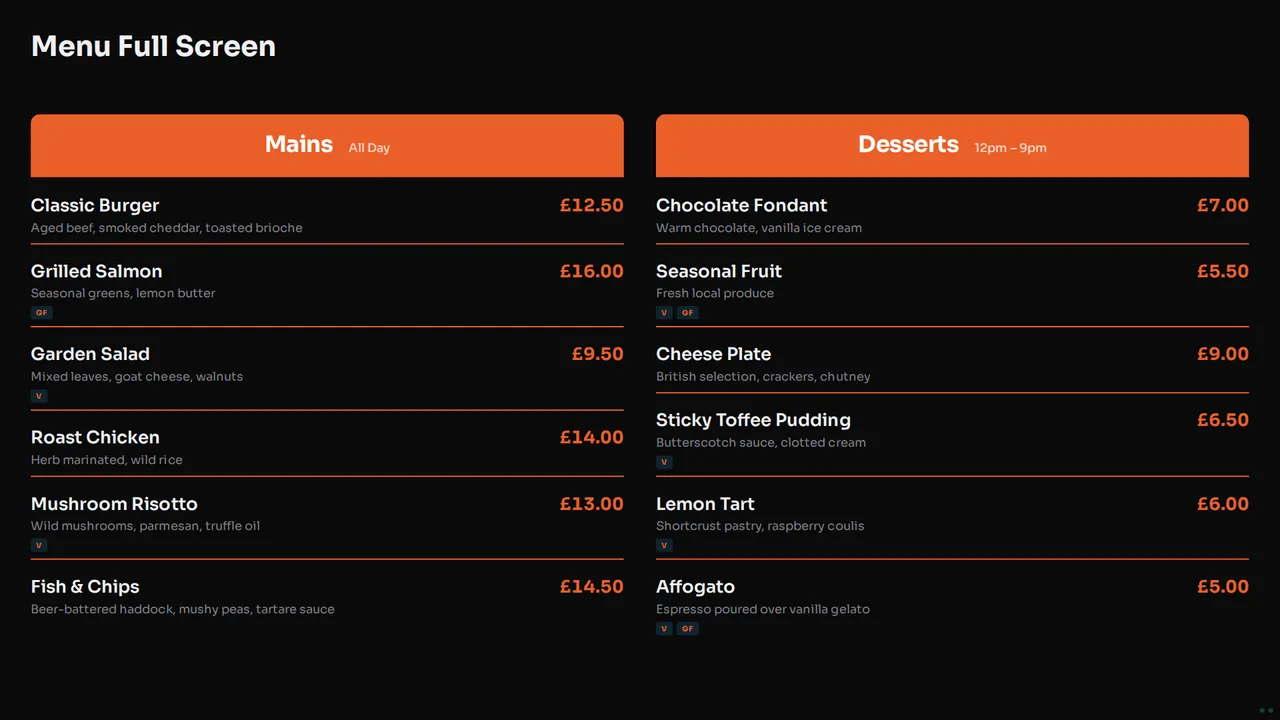
Good digital menu board design is not about decoration. It is about a customer at the back of the queue who can read the dish, the price and the badge in a few seconds, and then order. This guide covers layout, text size, colour, photos and screen shape for cafés, pubs and restaurants, with checks you can do in five minutes and templates to start from.
If you want the full launch list, read the digital menu board checklist. For the common errors, read eight restaurant menu screen mistakes. This guide is about the design decisions in between.
Start from where people stand
Before you choose a layout, find the three places where people read your menu: the back of the queue, the counter and the tables. The menu has to work from the farthest of these.
The five-minute check
- Put a draft menu on the TV.
- Stand at the back of the queue and read the cheapest item and its price.
- Do it again from the door and from the nearest table.
- Ask a colleague who has not seen the menu to find a vegan dish.
- If either of you hesitates, the text is too small or the menu is too full.
This check tells you more than any rule about text size, because it tests your room, your TV and your light.
Layout: rows, columns and one menu per screen
A menu screen reads best as rows: the dish name on the left, the price on the right, and a short description under the name. Two columns work well on a landscape TV, for example mains on the left and desserts on the right.

How many items fit depends on your TV and how far away people stand, so let the five-minute check decide. When a menu does not fit at a size people can read, do not shrink the text. Split the menu instead:
- Use two screens side by side, each with its own Board, for example food on one and drinks on the other.
- Or put two Boards in a Playlist on one screen, so mains and drinks take turns.
- Keep long descriptions for the table menu. The screen needs only enough words to choose.
Text size and contrast
There is no single correct text size, because the right size depends on the distance and the TV. Use the check above, and make the price the easiest thing to read on each row.
Contrast matters as much as size. Light text on a dark background suits most menu screens, because it does not glare in a dim dining room. A light background can work in a bright café. Whichever you choose, check it at the time of day when the room is brightest and when it is darkest. Keep the screen out of direct sunlight, which washes out any design.
Colour and brand
Your menu should look like your venue, not like a template. In NowBoard, your logo and colours sit on your Brand, and a Style decides where that colour appears: a coloured heading bar, a tinted background, or one accent and nothing more. Change the brand colour and every Board follows it.
There are ten Styles. Free includes Signal, Soft and Poster, and paid plans include all ten. See them on the Styles page. Use one strong colour for headings and prices, and keep the rest calm. A menu with five colours is hard to scan.
Photos: when they help and when they slow people down
A photo sells a dish that people do not know, such as a special or a signature plate. A photo on every line makes the menu slow to read, and pushes the prices down the screen.

A good split is a text menu for the full list and a separate specials Board with three or four large photos. Use your own photos of your own food, taken in good light.
Prices, dietary badges and sold out
Write every price the same way, for example £4.50 and never 4.5. Put dietary badges such as V, VG and GF next to the dish name, with a key on the Board. When a dish runs out, mark it sold out instead of deleting it, so guests stop asking for it. The checklist has the full list for prices and allergens.
Portrait or landscape
A landscape screen suits a two-column menu, a specials Board with photos, or a weekly menu with a column for each day. A portrait screen suits a long, narrow list, such as drinks, a wine list or a short café menu beside the counter. Choose the shape for the space on the wall, then choose Boards that fit it. The Menu template comes in both shapes.
Start from a template
You do not have to design a menu from a blank screen. Start from one of the NowBoard menu templates:
- Menu: the full menu in sections, with prices and dietary badges, in landscape or portrait.
- Weekly and Daily Menus: a menu for each day of the week, or for today.
- Today's specials: a second Menu Board with only today's dishes, so a daily change never touches the main menu.
Pick one, type your own dishes and run the five-minute check. See the get started guide for the set-up, or the digital menu boards page for what each Board does. Restaurant owners can see more on the restaurant digital signage page.
Questions
What makes a good digital menu board design?
A good digital menu board design is easy to read from the back of the queue. Each row has a dish, a short description and a price, the text contrasts with the background, and a long menu is split over two Boards or two screens.
How many items should a menu board show?
As many as people can read from where they stand, and no more. Stand at the back of the queue and read the cheapest item. If you cannot, show fewer items or split the menu across two Boards.
Should a digital menu have photos?
Use photos for a few dishes, such as specials or signature plates. A photo on every line makes the menu slow to read. A separate specials Board with three or four photos works well next to a text menu.
Can I use my own brand colours?
Yes. Add your logo and colours to your Brand and every Board uses them. Free and Starter include 1 Brand, and Professional and Enterprise include unlimited Brands.
See it on your own screens
We show you NowBoard with the Boards for your kind of place. Or sign up free.